Real Helpdesk Pattern – Building Helix Ticketing App with Next.js 16, PostgreSQL, and Prisma
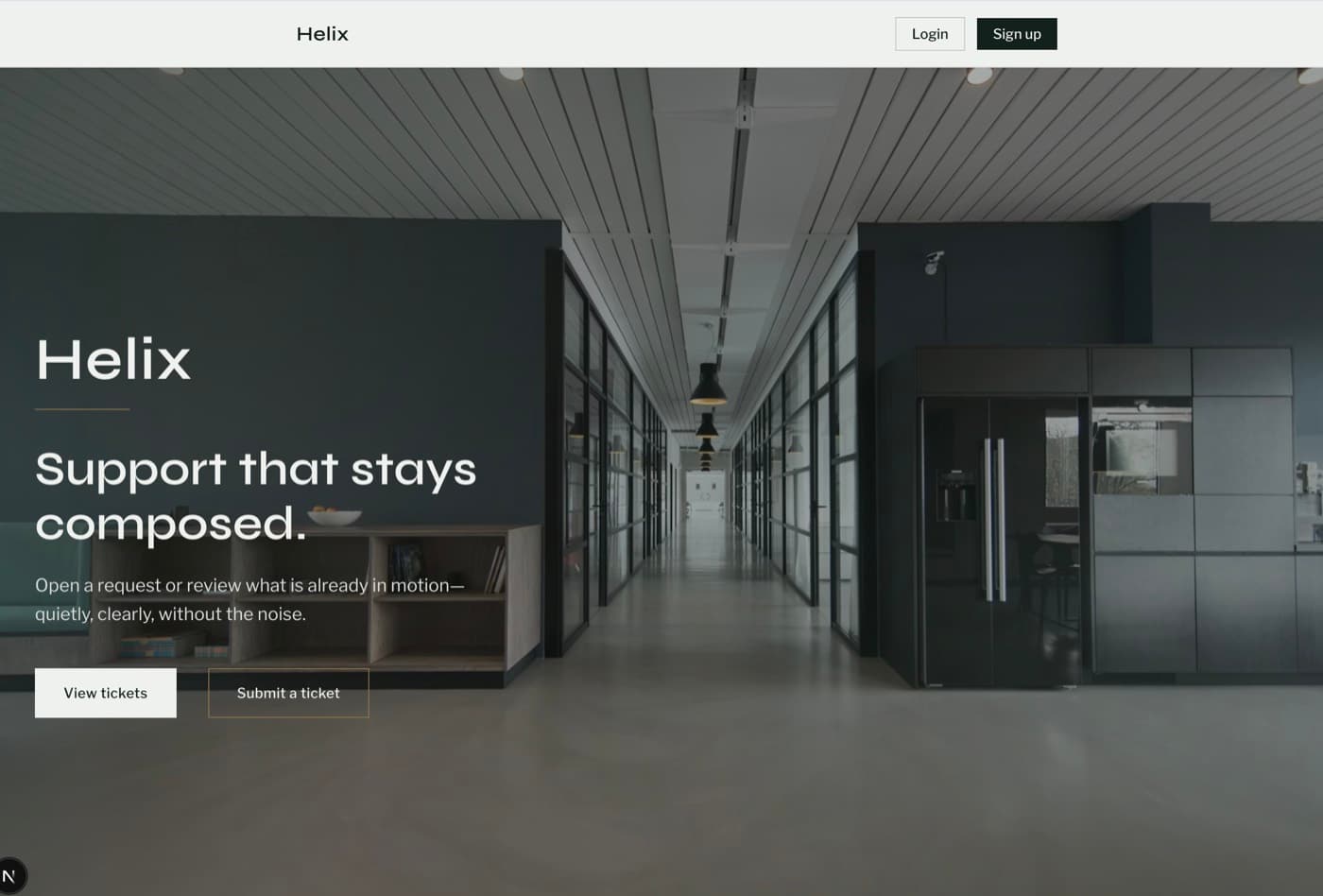
How I built Helix, a production-inspired helpdesk with Next.js 16, PostgreSQL, and Prisma — covering JWT/RBAC, soft deletes, closed-ticket UX, flash toasts, Docker Compose, Prisma migrations, Sentry, and a layered Vitest/Playwright test suite.
Helix Ticketing Real Helpdesk
Helix is a full-stack customer support platform I built to practice the parts of a helpdesk that portfolio “ticket apps” usually skip: JWT sessions, role-based access, threaded conversations, activity history, soft deletes, validation at the edge, polished loading/empty states, and production monitoring. It is an original product by Nanakumor Princewill — not affiliated with other products named Helix.
The goal was not another create/read/update list. Real support work needs auth, ownership rules, admin tooling, safe data handling when a user leaves the system without erasing ticket history, and a database story that travels with the app. This post walks through how Helix is structured today — including Dockerized Postgres, Prisma migrations, flash toasts, and a layered test suite — and the engineering decisions behind the flows that matter.
Why This App Exists
Many tutorial ticketing apps stop at a form and a table. That is fine for learning JSX — it is not enough for practicing production habits. Support products need answers to harder questions: Who can see which tickets? What happens when an admin removes a user who still owns open requests? How do you keep an audit trail when status changes? How do you stop credential stuffing without blocking legitimate logins? How do you make closed work scannable without deleting it?
Helix was designed around those questions. Users register and sign in, submit prioritized tickets, discuss them in comment threads, and close work when it is done. Admins see every ticket, manage users, and soft-delete accounts while reassigning ownership so history stays intact. Recent polish focused on the product feel: closed tickets are visually muted, flash toasts confirm key actions, and loading/empty states keep navigation honest.
Tech Stack
- Next.js 16 (App Router) + React 19 + TypeScript
- PostgreSQL 17 with Prisma 7 (@prisma/adapter-pg) as the relational source of truth
- Versioned Prisma SQL migrations under prisma/migrations
- Server Actions for mutations (no separate REST API layer)
- JWT sessions via jose, httpOnly cookies, bcrypt password hashing
- Zod schemas for ticket, comment, auth, and user forms
- Sentry for runtime error visibility
- Docker + Docker Compose for app + Postgres local/demo runs
- Vitest (unit + integration) + Playwright E2E with axe-core a11y
- Tailwind CSS v4 with Syne + Libre Franklin for a calm, paper-and-ink UI
Application Structure & Routes
Helix is a server-action app. Pages are Server Components that load data through action helpers; forms post to Server Actions that validate, mutate Prisma, log activity, set flash cookies, revalidate paths, and redirect or return field errors. A global navbar sits on every page — including the homepage — with ticket counts and admin links when authorized.
- / — full-viewport branded homepage (100dvh under the nav) with CTAs into the inbox
- /login and /register — auth with Zod + rate-limited login + pending UI
- /tickets — inbox (own tickets for users, all tickets for admins) with empty states
- /tickets/new — create ticket with priority and client/server validation
- /tickets/[id] — detail, threaded comments, activity timeline, close flow
- /users and /users/[id] — admin console for user management and soft-delete
Protected routes check the session against the database and ignore soft-deleted users, so a revoked account cannot keep a stale JWT alive indefinitely. Navbar auth sync clears cookies when the DB user no longer exists or is soft-deleted.
File Structure
helix-ticketing-app/
├── app/
│   ├── actions/
│   │   ├── auth.ts              # register, login, logout + flash
│   │   ├── tickets.ts           # create, list, comment, close
│   │   ├── users.ts             # admin list / edit / soft-delete
│   │   └── navbar-auth.ts       # re-sync session for soft-deleted users
│   ├── tickets/ · users/ · login/ · register/
│   ├── loading.tsx              # route-level PageSpinner
│   └── page.tsx                 # full-viewport marketing homepage
├── components/
│   ├── toast.tsx · modal.tsx
│   ├── navbar.tsx · navbar-client.tsx
│   └── page-spinner.tsx · navigation-spinner.tsx
├── lib/
│   ├── current-user.ts · flash.ts · login-rate-limit.ts
│   ├── ticket-id.ts · user-id.ts · ticket-activity.ts
│   └── prisma.ts · sentry.ts
├── prisma/schema.prisma · prisma/migrations/
├── Dockerfile · docker-compose.yml
└── e2e/ · tests/integration/ · TESTING.md
The split is deliberate: app/actions owns authorization and mutations, lib/ owns session crypto, IDs, rate limits, flash, and observability, components/ own shared UX chrome, and Prisma owns the relational model with migrations that travel with the repo.
Data Models
PostgreSQL holds four core entities: User, Ticket, Comment, and TicketActivity. Roles are USER or ADMIN. Ticket status covers open, in_progress, pending, and closed. Assignee support was restored via a dedicated migration after an earlier workflow experiment — the migration history is part of the product story, not an afterthought.
model User {
  id           String    @id
  email        String    @unique
  name         String
  passwordHash String
  role         Role      @default(USER)
  deletedAt    DateTime?
  ownedTickets Ticket[]  @relation("TicketOwner")
  comments     Comment[]
  activities   TicketActivity[]
}

model Ticket {
  id          String       @id          // e.g. SB4826323
  subject     String
  description String
  priority    String
  status      TicketStatus @default(open)
  userId      String
  assigneeId  String?
  closedAt    DateTime?
  comments    Comment[]
  activities  TicketActivity[]
}
Ticket and user public IDs are human-friendly (two letters + seven digits) with collision retries on create. Soft delete lives on User.deletedAt — tickets are not hard-deleted when an account is removed.
Auth: JWT Sessions, Hashing, and Rate Limits
Sessions are JWTs signed with jose (HS256), stored in an httpOnly cookie. On each request, getCurrentUser verifies the token and re-loads the user from Postgres with deletedAt: null. That double-check means soft-deleted users lose access even if their cookie has not expired yet.
const token = await new SignJWT({
  sub: user.id,
  email: user.email,
  name: user.name,
  role: user.role,
})
  .setProtectedHeader({ alg: "HS256" })
  .setIssuedAt()
  .setExpirationTime(`${SESSION_HOURS}h`)
  .sign(getSecret());
Passwords are bcrypt-hashed on register. Login is rate-limited per email + IP (five attempts per fifteen minutes) before bcrypt runs, so brute-force attempts fail closed without hammering the database.
- Designated ADMIN_EMAIL is forced to ADMIN on register/update
- Primary admin and last remaining admin cannot be soft-deleted
- Admins cannot delete their own account from the console
- Failed logins are recorded for Sentry-friendly observability
Ticket Lifecycle & Closed-Ticket UX
Creating a ticket is a Server Action: require a session, Zod-parse subject/description/priority, allocate a unique ticket ID, write the row, and record a created activity. Comments append to the thread with author metadata. Closing a ticket sets status to closed, stamps closedAt, records activity, and flashes a confirmation toast.
User submits form
  → ticketSchema.safeParse(...)
  → createTicketWithUniqueId(...)   // retry on P2002
  → recordTicketActivity("created")
  → revalidatePath("/tickets")
  → return { success, ticketId }

Close ticket
  → ownership / admin check
  → status = closed + closedAt
  → activity + flash("ticket_closed")
  → UI: strikethrough, muted row, replies disabled
Closed work stays in the inbox but reads as finished: list and detail views apply strikethrough, reduced opacity, and a muted background. The close control disappears, and new replies are blocked with a clear message. That is a small visual decision with a big product effect — operators can scan active vs resolved work without deleting history.
Admin Soft Delete Without Losing History
Hard-deleting a user who owns tickets either cascades history away or leaves orphaned foreign keys. Helix soft-deletes instead: inside a transaction, owned tickets are reassigned to the acting admin, then the user row is stamped with deletedAt and a tombstone email/name so unique email constraints stay free for future registrations.
await prisma.$transaction([
  prisma.ticket.updateMany({
    where: { userId },
    data: { userId: admin.id },
  }),
  prisma.user.update({
    where: { id: userId },
    data: {
      deletedAt: new Date(),
      email: `deleted+${userId}@deleted.invalid`,
      name: `${existing.name} (deleted)`,
    },
  }),
]);
That pattern keeps the ticket inbox and activity log coherent while removing the account from day-to-day admin lists (queries filter deletedAt: null). Confirm modals and a user-deleted toast keep the destructive path intentional.
Validation, Flash Toasts, and Loading States
Every mutation path starts with Zod. Ticket subjects max out at 120 characters; descriptions require at least ten characters; priorities are a closed enum (Low / Medium / High). Auth and user-edit schemas follow the same shape: flatten field errors for the form, return a clear message, and only then touch Prisma.
export const ticketSchema = z.object({
  subject: z.string().trim().min(1).max(120),
  description: z.string().trim().min(10).max(5000),
  priority: z.enum(["Low", "Medium", "High"]),
});
Beyond validation, Helix treats feedback as part of the product: cookie-based flash messages drive sign-in, ticket-closed, and user-deleted toasts; route-level and navigation spinners cover transitions; empty states explain what to do next when an inbox or thread has nothing yet. Those details are what separate a demo form from something that feels operable.
Docker, Migrations, and Local Reproducibility
A helpdesk without a portable database story is hard to demo or hand off. Helix ships a Dockerfile (Node 22 Alpine) and docker-compose.yml that runs Postgres 17 beside the app, plus a full Prisma migration history — from initial schema through user/ticket public IDs, status enums, comments/activity, and restoring the assignee column.
- docker-compose.yml — postgres:17 volume + app service on port 3000
- prisma/migrations — versioned SQL that matches the Prisma schema
- .env.example — DATABASE_URL, AUTH_SECRET, ADMIN_EMAIL, Sentry token
- postinstall prisma generate so clients stay in sync after npm install
That makes local setup and demos closer to how a real team would run the stack: migrate the database, boot the app, exercise the flows, and keep schema changes reviewable in git.
Testing Strategy
Helix uses a layered suite that matches a Server Action architecture (there is no separate HTTP API to unit-test). The approach is documented in TESTING.md rather than a stock README.
- Vitest unit tests (~74) for IDs, Zod schemas, rate limits, and mocked actions
- Integration tests (~4) against real Postgres for register → ticket → comment → close
- Playwright E2E (~6) for the happy-path ticket flow, bad login, and axe-core a11y
- Business rules (authz, soft-delete guards) live close to the server actions
Unit tests stay fast by mocking Prisma, cookies, redirects, and Sentry. Integration and E2E require DATABASE_URL, AUTH_SECRET, and ADMIN_EMAIL — the same env shape as local development. Disposable *@helix-test.invalid emails keep test data easy to spot and clean up.
Engineering Challenges & Decisions
- Server Actions instead of REST — fewer moving parts, but authz must be explicit on every mutation
- Human ticket/user IDs with collision retries instead of opaque cuid-only references
- Soft delete + reassignment instead of cascade-delete that would erase support history
- Session JWT plus DB re-check so deleted users cannot linger on a valid cookie
- Login rate limiting keyed by email and IP before expensive bcrypt work
- Closed-ticket visual language so resolved work stays visible without looking active
- Flash cookies + toasts for cross-redirect confirmation instead of fragile client-only state
- Prisma migrations + Docker Compose so the database story is reproducible
- Sentry event helpers on success and failure paths for deploy-time visibility
What I Learned
- Helpdesk quality is mostly authorization, data-safety, and feedback UX — not only the ticket form
- Soft deletes need a product decision (reassign vs archive) before you touch the schema
- Zod + Server Actions give form UX and server trust from one schema source
- Loading, empty, and closed states are product features, not CSS afterthoughts
- Migrations and Compose turn “it works on my machine” into something you can demo
- Integration tests against Postgres catch ownership bugs that mocks hide
Conclusion
Helix Ticketing App is a compact helpdesk, but it follows production-minded decisions: JWT sessions with DB verification, RBAC, threaded tickets, activity history, soft deletes that preserve ownership context, Zod at every edge, polished operational UX, Dockerized Postgres with migrations, and a layered test suite. Those are the patterns I wanted to practice end to end — and the ones I look for when reviewing real support products.
The same ideas transfer beyond ticketing: validate early, authorize on every write, prefer soft retention when history matters, make state changes obvious in the UI, and keep mutations close to the domain instead of scattering logic across ad-hoc API routes.