From Noisy API Output to a Reliable Tool – Building a VIN Decoder with Next.js 15, Zod, and the NHTSA VPIC API
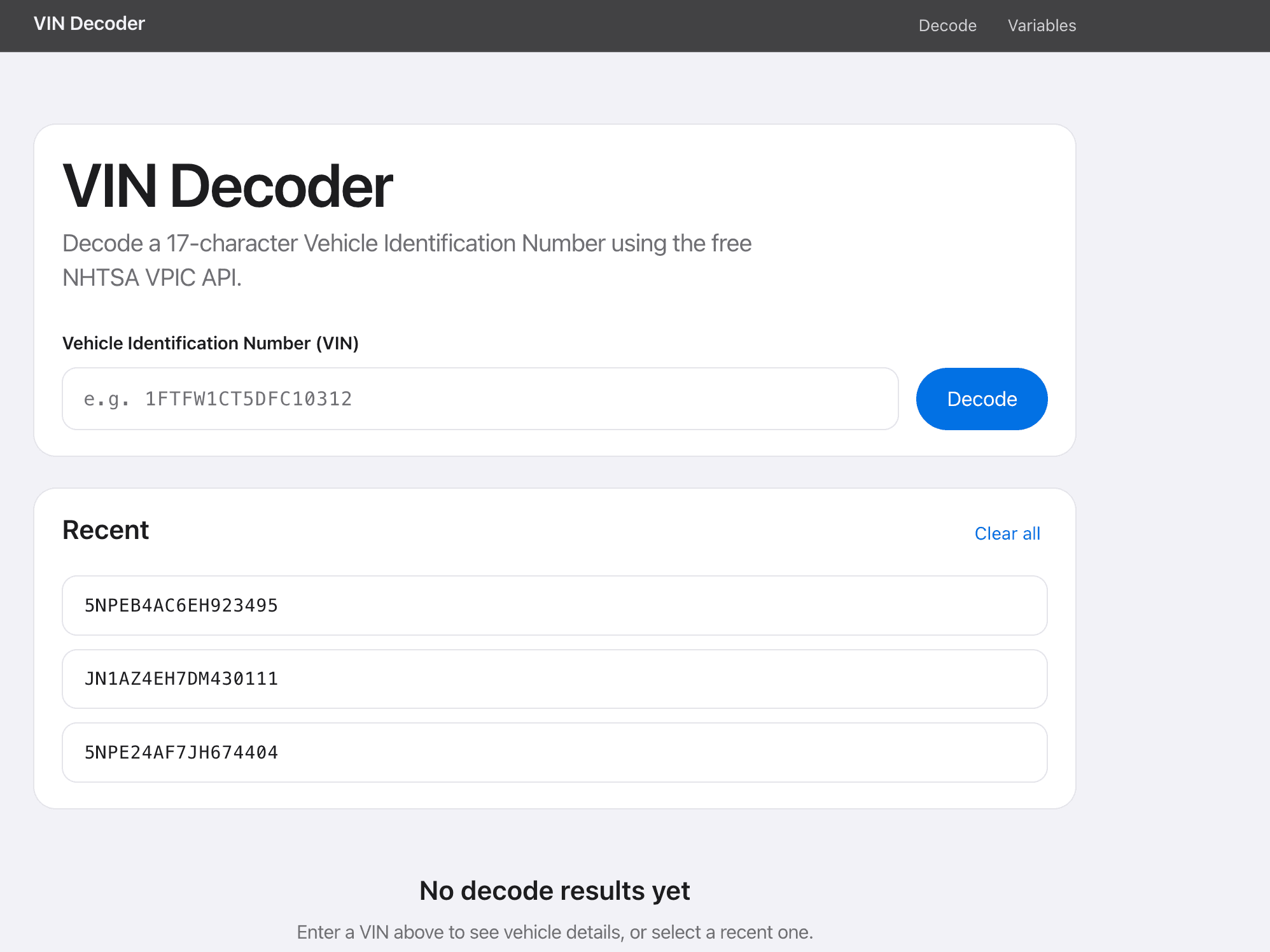
How I built a production-minded VIN Decoder with Next.js 15, Zod, and the NHTSA VPIC API — covering validation, decode pipelines, filtered results, local history, variable browsing, and the engineering decisions behind a reliable utility app.
From Noisy API Output to a Reliable Tool – Building a VIN Decoder with Next.js 15, Zod, and the NHTSA VPIC API
I built this VIN Decoder as a focused utility app: take a VIN, validate it properly, decode it using a trusted public API, and present only the data that actually matters to users. The goal wasn’t to build a flashy UI. The goal was to build a reliable tool that feels predictable.
In many small tools, the core functionality works, but the product quality suffers from weak validation, noisy API output, or repetitive user steps. This project was an exercise in fixing exactly those three problems — and expanding the decoder into a lightweight reference experience with vehicle variable browsing.
Why This App Exists
A VIN decoder sounds simple, but the user experience can break fast. Invalid VIN input leads to confusing errors, NHTSA responses often include sparse or empty fields, and users regularly decode the same VINs when comparing vehicles.
I wanted an app that solves that with a practical workflow: strict client validation before requests, filtered decode results, short-term decode history, and a variables catalog so users can understand what each decoded field means.
Tech Stack
- Next.js 15.5 (App Router) — routing, SSR for variables, ISR caching
- React 19 — client UI for decode form, history, and results
- TypeScript — shared types for decode results and vehicle variables
- Zod 4 + React Hook Form — schema-first VIN validation
- NHTSA VPIC API — free public vehicle decode + variable metadata
- localStorage — last 3 successful VIN decodes
- Plain CSS — compact design system without a heavy UI library
Application Structure & Routes
The app is intentionally small. Decode happens on the client against the public NHTSA API. Variables are fetched on the server so they can be cached with ISR.
- / — decode form, recent history, filtered results table
- /variables — searchable vehicle variables catalog (SSR + ISR)
- /variables/[id] — variable detail page (description, type, group)
There are no Next.js API routes and no database. The public NHTSA endpoints are the backend.
File Structure
vin-decoder/
├── app/
│   ├── layout.tsx
│   ├── page.tsx                 # Home → HomePageClient
│   ├── loading.tsx / error.tsx
│   ├── globals.css
│   └── variables/
│       ├── page.tsx             # Variables index (SSR + ISR)
│       └── [id]/page.tsx        # Variable detail
├── components/
│   ├── home/HomePageClient.tsx  # Decode + history orchestration
│   ├── layout/Header.tsx, Container.tsx
│   ├── vin/                     # Form, history, results, table
│   └── variables/               # VariableList, VariableCard
├── hooks/
│   ├── useDecodeVin.ts
│   └── useVinHistory.ts
├── lib/
│   ├── api/decodeVin.ts, getVariables.ts, getVariable.ts
│   ├── storage/history.ts
│   ├── utils/filterResults.ts, stripHtml.ts
│   └── validation/vinSchema.ts
└── types/
    ├── vin.ts
    └── variable.ts
The split is deliberate: lib/ owns API and storage logic, hooks/ own React state, and components/ stay focused on presentation and interaction.
Data Models
Even without a database, typed models keep the decode pipeline and UI consistent. The decode response and variable catalog both follow the NHTSA VPIC shape.
// Decode result row from NHTSA VPIC
type DecodeResult = {
  Variable?: string;
  Value?: string | null;
  VariableId?: number;
};

// Vehicle variable metadata
type VehicleVariable = {
  ID: number;
  Name: string;
  Description?: string;
  GroupName?: string;
  DataType?: string;
};
Form values are also typed through Zod inference: VinFormValues for input, and a parsed type after transforms like uppercase normalization.
Decode Pipeline
The decode flow is a short, explicit pipeline. Each step has one job, which made debugging and UX polish much easier.
User types VIN
  → VinForm sanitizes (strip spaces, UPPER, max 17)
  → React Hook Form + Zod validates on submit
  → HomePageClient.handleDecode(vin)
      → useDecodeVin.decode(vin)
          → lib/api/decodeVin.ts (browser fetch to NHTSA)
          → filterResults(response.Results)
          → set decoded state { vin, message, results }
      → on success: useVinHistory.saveVin(vin)
  → UI: ErrorMessage | LoadingSpinner | DecodeResults
History is only written after a successful decode. Failed validation and network errors never pollute the recent VIN list.
API Design: NHTSA VPIC
The app uses two NHTSA VPIC workflows: VIN decoding for immediate answers, and variable exploration for field context.
GET https://vpic.nhtsa.dot.gov/api/vehicles/decodevin/{vin}?format=json
GET https://vpic.nhtsa.dot.gov/api/vehicles/getvehiclevariablelist?format=json
Decode calls happen directly from the browser. Variables are fetched on the server with a 24-hour revalidate window so the catalog stays fast without re-hitting NHTSA on every page load.
export async function decodeVin(vin: string) {
  const response = await fetch(
    `https://vpic.nhtsa.dot.gov/api/vehicles/decodevin/${encodeURIComponent(vin)}?format=json`
  );

  if (!response.ok) {
    throw new Error(`Failed to decode VIN (${response.status})`);
  }

  return response.json();
}
There is no per-variable NHTSA endpoint in this app. Variable detail pages fetch the full list (cached) and find the matching ID. That keeps the client simple while ISR absorbs the cost.
Input Validation First
The fastest way to improve trust in a data tool is to reject bad input early. Instead of sending everything to the API and showing generic failure messages, the app validates VIN structure on the client with Zod and React Hook Form.
export const vinSchema = z.object({
  vin: z
    .string()
    .trim()
    .min(1, "VIN is required")
    .max(17, "VIN must be at most 17 characters")
    .regex(
      /^[A-HJ-NPR-Z0-9]+$/i,
      "VIN may only contain letters and numbers (no I, O, or Q)"
    )
    .transform((value) => value.toUpperCase()),
});
The form also sanitizes on input and paste: whitespace is stripped, characters are uppercased, and length is capped at 17. That reduces avoidable validation errors before submit.
Filtering API Results for Real Use
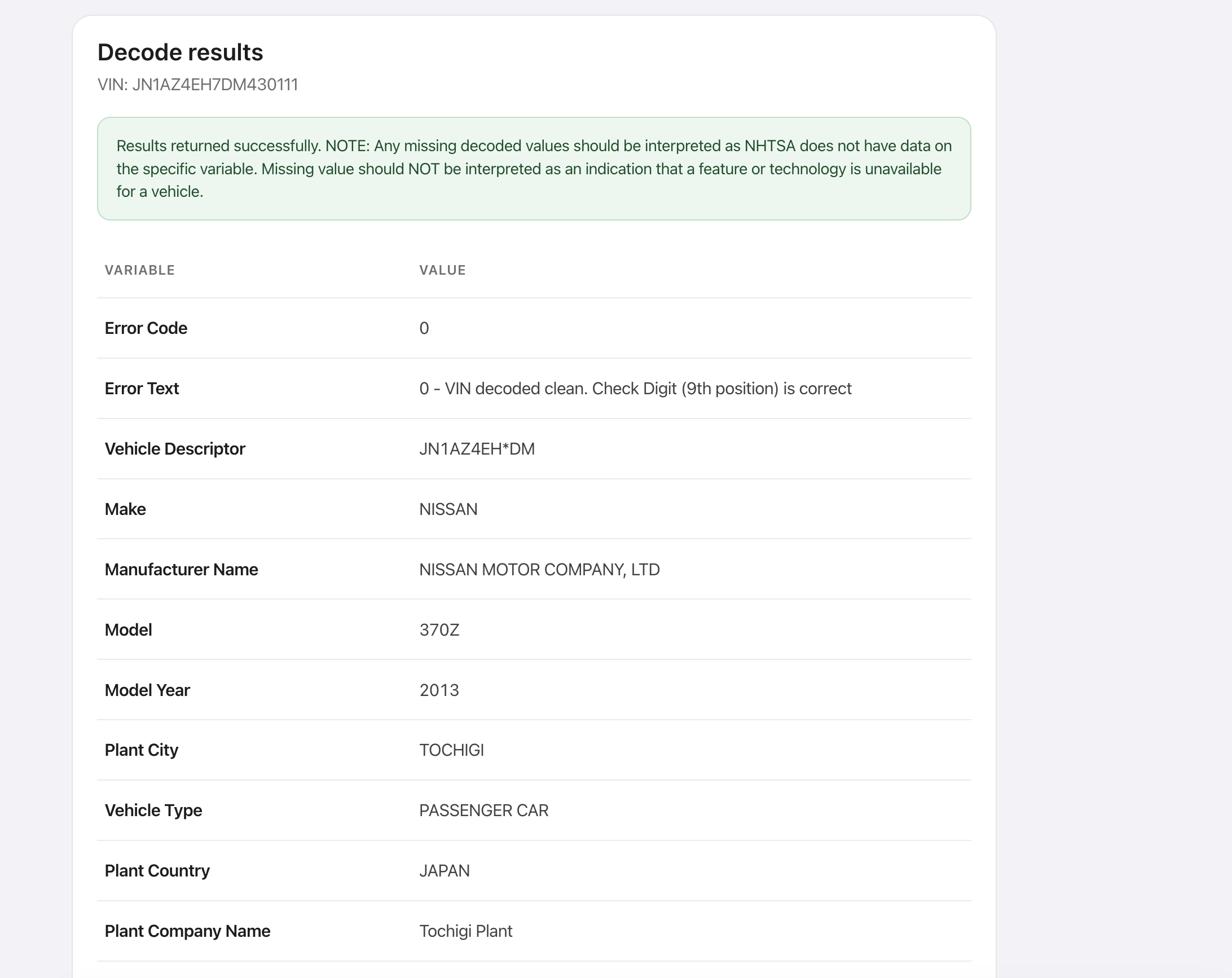
Raw NHTSA decode output is noisy. Many rows have empty values or incomplete variable names. Showing everything makes the tool feel broken even when the important fields are present.
export function filterResults(results: DecodeResult[]) {
  return results.filter(
    (item) =>
      Boolean(item.Variable?.trim()) &&
      item.Value !== null &&
      item.Value !== undefined &&
      String(item.Value).trim() !== ""
  );
}
The result table only shows Variable and Value pairs that survive filtering. Soft API messages from NHTSA still appear in an info banner above the table.
Persistent History (Last 3 VINs)
A small UX decision with a big effect: store the most recent successful decodes in localStorage under lastThreeVins. Users can click any previous VIN and immediately reload results without retyping.
- Store only successful decodes
- Keep the newest VIN first
- Deduplicate and cap history at 3
- Guard window access for SSR safety
- Recover gracefully from corrupt JSON
const STORAGE_KEY = "lastThreeVins";
const MAX_HISTORY = 3;

export function addVin(vin: string): string[] {
  const normalized = vin.trim().toUpperCase();
  const next = [
    normalized,
    ...getHistory().filter((item) => item !== normalized),
  ].slice(0, MAX_HISTORY);

  localStorage.setItem(STORAGE_KEY, JSON.stringify(next));
  return next;
}
UI & Interaction Design
The homepage is a vertical stack of focused panels: decode form, recent history, loading state, then results. Each panel has one job.
- VinForm — controlled VIN input with live sanitization and Decode CTA
- VinHistory — clickable recent VINs plus clear-all
- DecodeResults — NHTSA message + filtered Variable/Value table
- VariableList / VariableCard — searchable catalog linking to detail pages
- Shared ErrorMessage, LoadingSpinner, and EmptyState components
While decoding, the form and history controls are disabled so users cannot spam requests. Empty states distinguish “no decode yet” from “API returned no useful values.” Variable detail pages strip HTML from NHTSA descriptions before rendering.
Engineering Challenges & Decisions
Most of the hard work was not wiring the fetch call. It was deciding where validation, filtering, caching, and persistence should live.
- Client-side decode vs server proxy — NHTSA is public and CORS-friendly, so decode stays in the browser with no secrets and no BFF complexity
- Server-side variables with ISR — the variables catalog is large and stable enough to cache for 24 hours
- Aggressive result filtering — sparse rows are removed so the table stays readable
- History capped at 3 — intentional short-term compare UX, not a long archive
- Variable detail via full-list lookup — simple implementation that reuses the cached list endpoint
- Prebuild first 50 variable pages — balance build time against coverage; remaining IDs render on demand
Error handling is layered too: Zod covers bad input, the decode hook covers network/HTTP failures, NHTSA Message banners cover soft API responses, and route-level error/not-found boundaries cover page failures.
Performance Optimisations
- ISR on /variables and /variables/[id] with revalidate = 86400
- generateStaticParams prebuilds the first 50 variable detail pages
- Client validation prevents unnecessary NHTSA requests
- Filtered decode results reduce DOM size in the results table
- localStorage history avoids retyping and reduces repeated decode work
- No database and no custom API layer — fewer moving parts in production
- Plain CSS design system instead of a heavy component library
What I Learned
- Validation is part of product UX, not just correctness
- Filtering output is as important as fetching output
- Small persistence features like last-3 history can change repeat workflows
- Public APIs still need deliberate caching and empty-state design
- Simple architecture is easier to maintain when each layer has one responsibility
Conclusion
This VIN Decoder is a compact app, but it follows production-minded decisions: schema validation, a clear decode pipeline, filtered data shaping, cached variable browsing, and persistent short-term history. Building it was less about decoding VINs and more about designing a dependable utility product.
The same patterns apply beyond vehicles — validate early, shape noisy API responses before they hit the UI, cache stable reference data, and keep repeat workflows short.
Links
- Live demo: https://vin-decover.vercel.app
- GitHub: https://github.com/Princewill-Nanakumor/vin-decover.git
- NHTSA VPIC API docs: https://vpic.nhtsa.dot.gov/api/
- Portfolio project page: https://princewillnanakumor.com/projects/vin-decoder