From Spreadsheets to a Full SaaS CRM – Building Motherland CRM Solutions
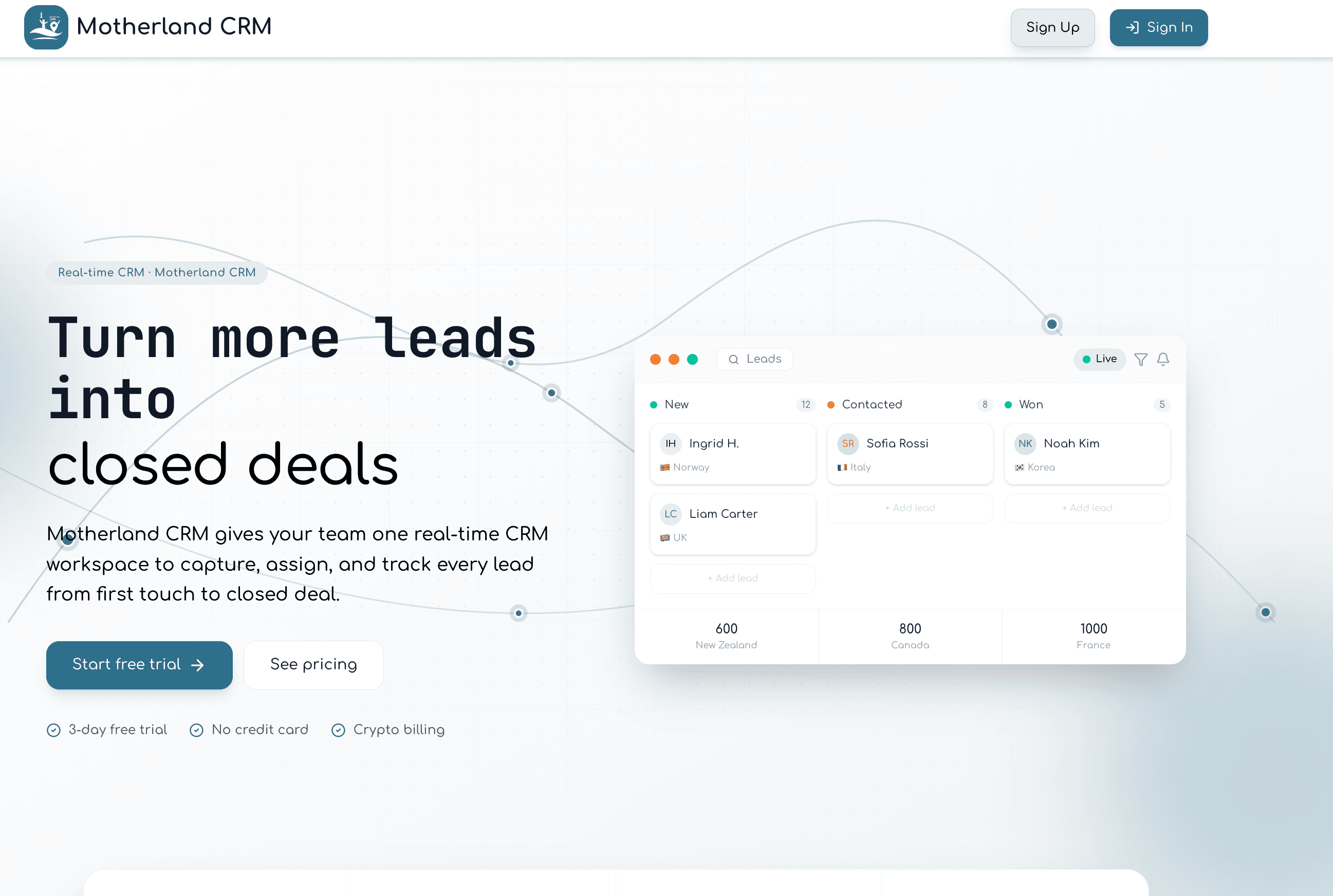
Motherland CRM Solutions is a multi-tenant SaaS CRM for sales teams leaving Excel: chunked CSV/Excel import with a leased resume-safe worker, ADMIN / SUBADMIN / AGENT roles, Ably realtime, board charts, dialer call logs, and host branding. Latest measured suite: 237 Vitest passing, Playwright lifecycle/smoke, Mongo load through 100k, midflight kill→resume, 50k HTTP soak (~134–217 leads/s after tuning), and 5×50k concurrent tenants — live at motherlandcrmsolutions.com.
The Problem — Why This App Exists
Most small to medium sales operations still manage their leads in Excel or Google Sheets. These static files don't reflect real-time status, can't be shared safely between team members, offer no visibility into agent activity, and fall apart the moment the data grows beyond a few thousand rows. The result is duplicated outreach, missed follow-ups, and managers who genuinely don't know what their team is doing.
Motherland CRM Solutions was built to solve exactly this. The product targets sales-driven businesses that already have lead data in spreadsheets and need a fast, structured way to import that data, distribute it to a team, and track every touchpoint all from one application, in real time.
Tech Stack
Every technology choice in this project was deliberate. Here is the full stack and the reasoning behind each decision:
- Next.js 15 (App Router) — Full-stack framework handling both the frontend and backend API routes in one codebase. The App Router enables server components, async layouts, and edge middleware which are all used heavily.
- TypeScript — Strict typing across both client and server. Shared interfaces between database models, API responses, and React components eliminate an entire class of runtime bugs.
- MongoDB + Mongoose — Document database chosen for flexible schema evolution during early product development. CRM data (lead fields, custom statuses, import metadata) evolved frequently in early iterations.
- NextAuth v4 (Credentials Provider) — JWT-based authentication with a fully custom token payload.
- TanStack React Query v5 — All server state (leads, users, payments, notifications) is managed through React Query. Background refetching, cache invalidation, and optimistic updates are all handled here.
- Zustand v5 — Lightweight global state for pure UI concerns: which lead is selected, whether the detail panel is open, which leads are bulk-selected.
- Ably — Managed WebSocket pub/sub for real-time cross-user updates. Any change to a lead is instantly visible across all open browser sessions in that workspace.
- Framer Motion — Declarative animations for the lead details panel slide-in, plus seasonal holiday overlays.
- TanStack React Table v8 — Headless table logic for sorting, pagination, column visibility, and row selection — with full control over the rendered markup.
- Tailwind CSS v4 + Radix UI — Utility-first styling with accessible dialogs, selects, and menus; light and dark mode via next-themes.
- Recharts — Bar and pie charts on the dashboard fed by /api/leads/status-counts.
- Zod + React Hook Form — Form validation with schema-first definitions shared between client validation and server-side API validation.
- dnd-kit — Accessible drag-and-drop for reordering table columns. The column order is persisted to localStorage per user.
- Resend — Email verification and password reset flows.
- Vitest + Playwright — 237 passing unit/API/component tests under src/tests/ (1 skipped enablement gate), Playwright smoke + seeded lead-lifecycle E2E, plus opt-in import load/soak/bench/concurrent/browser-pressure/midflight-kill harnesses documented in TESTING.md.
Application Structure & Routes
The application is split into a public marketing site and an authenticated dashboard. All dashboard routes are protected by Next.js middleware. Role-based access control determines what a logged-in user can see. Admins, Sub-admins and Agents see entirely different menus and page sets.
Public Pages
- Marketing homepage
- /login — Credentials sign-in form
- /signup
- /(auth)/reset-password — Set a new password via token link
- /(auth)/verify-email — Email address verification handler
- /(auth)/forgot-password — Trigger password reset email
Dashboard Pages (Authentication Required)
- /dashboard — Overview stats plus status-distribution charts (Recharts bar/pie from /api/leads/status-counts)
- /dashboard/all-leads — Admin (and permitted sub-admins) full lead table with server-side pagination, include/exclude multi-filters, bulk assign/unassign/status/delete, column drag-and-drop
- /dashboard/all-leads/:id — Same page with the lead detail panel opened to a specific lead
- /dashboard/leads — Agent/sub-admin assigned leads view • /dashboard/leads/:id — Assigned table with detail panel open
- /dashboard/users — Team management: create agents and sub-admins, grant permissions, deactivate, view call logs
- /dashboard/import — CSV and Excel import/export wizard with column mapping and validation
- /dashboard/adsManager — Manage motivational/promotional content shown in the lead panel
- /dashboard/billing — Deposit funds via USDT crypto (TRC20/ERC20) and view transaction history
- /dashboard/payment-details/:id — Admin reviews and approves or rejects a specific payment
- /dashboard/subscription — Current subscription plan details and upgrade options
- /dashboard/notifications — Notification center and reminder management (dueAt + snooze)
- /dashboard/profile — Edit personal details, change password, delete account
- /dashboard/settings — Appearance, softphone dialer (MicroSIP/Zoiper), date/time format, sidebar preferences
- /dashboard/help — Help and support documentation (Admin only)
- /dashboard/admin-management — Super-admin view: manage other admin accounts (restricted by email whitelist)
- /dashboard/admin-management/:id — Detailed view of a specific admin: their agents, leads, payments, subscription
Multi-Tenancy Architecture
The application uses a shared-database, separate-data multi-tenancy model. Every record in MongoDB — every lead, every user, every payment, every activity log — carries an adminId field. This single field is the isolation boundary between every customer's workspace. An admin from Workspace A can never query, see, or modify data from Workspace B, even though all the data lives in the same database and same collections.
When an ADMIN user logs in, their ID becomes the adminScope — a string that namespaces all of their data. When an AGENT logs in, their token carries the adminId of the admin who created them. Every API route, every database query, and every Ably realtime channel is scoped to this adminId. This approach keeps infrastructure simple (one deployment, one database) while providing complete data isolation per customer.
// Every leads query is scoped to the current admin's workspace // An admin sees all leads under their adminId // An agent sees only leads assigned to them within the same adminId

const query = isAdmin ? { adminId: currentAdminId } // Admin: all workspace leads : { adminId: agentAdminId, assignedTo: userId }; // Agent: only their leads

const leads = await Lead.find(query) .sort({ createdAt: -1 }) .skip((page - 1) * pageSize) .limit(pageSize) .lean();
Role System
The application has four access levels. Tenant staff always keep adminId pointing at the workspace owner — a SUBADMIN is not a second tenant owner. Extra sub-admin capabilities are opt-in via a permissions[] array that only an ADMIN may grant.
- Super Admin — A small set of email addresses listed in the SUPER_ADMIN_EMAILS environment variable. These users can access /dashboard/admin-management and view, manage or delete any admin's account, subscription, and payments. This is the platform operator level.
- ADMIN — A business owner or team leader. They own a workspace: they import leads, create agents and sub-admins, assign leads, handle billing, and view all activity. Admins cannot view other admins' data.
- SUBADMIN — An elevated agent. By default they work like an AGENT (assigned leads only). An ADMIN can grant ASSIGN_LEADS, EDIT_LEAD_STATUS, MANAGE_REMINDERS, and/or DELETE_COMMENTS so they can help run the floor without getting billing or full owner access.
- AGENT — A salesperson. They see only the leads assigned to them. They can update status on their leads, add comments, log calls through the dialer, and set reminders. They cannot access billing, import, or user management.
Role enforcement happens at three layers: the Next.js middleware (edge, before the page loads), the API route handlers (server, before any data is touched), and the React component layer (UI elements are conditionally rendered based on the session role).
Authentication & Session Expiry
Authentication uses NextAuth v4 with a Credentials provider — meaning users sign in with email and password, not via OAuth. Sessions are JWT-based with a hard 24-hour expiry. The most important constraint was preventing sliding sessions: the session must expire 24 hours after login, not 24 hours after the last request.
I implemented a three-timestamp system in the JWT payload to enforce this reliably. On login, three values are written into the token: exp (absolute Unix expiry time), iat (token issued-at time), and loginTimestamp (original login time). All three are checked independently on every token evaluation. If any one exceeds the 24-hour window, the session is invalidated.
async jwt({ token, user }) {
  const nowSec = Math.floor(Date.now() / 1000);
  const maxAge = SESSION_MAX_AGE_SECONDS; // 86400 (24 hours)

  if (user) {
    // On login: set all three timestamps
    token.exp = nowSec + maxAge;
    token.loginTimestamp = nowSec;
    token.iat = token.iat ?? nowSec;
  } else if (token) {
    // On subsequent requests: check all three
    const expiredByExp   = token.exp < nowSec;
    const expiredByIat   = nowSec - token.iat > maxAge;
    const expiredByLogin = nowSec - token.loginTimestamp > maxAge;

    if (expiredByExp || expiredByIat || expiredByLogin) {
      // Strip id — makes session appear invalid without throwing
      return { ...token, id: undefined, exp: 0 };
    }
  }
  return token;
}
The same check runs in the Next.js middleware at the edge before any dashboard page renders — so expired users are redirected to /login immediately, even before React hydrates. A client-side timer checks expiry every 5 minutes and triggers a graceful sign-out with the current page stored as the callbackUrl, so users return to exactly where they were after re-authenticating.
Database Models
The database layer uses 12 Mongoose models, each carefully indexed for the query patterns the application actually runs. Here is a breakdown of the most important models:
User Model
- role: "ADMIN" | "SUBADMIN" | "AGENT"
- permissions: string[] — grantable SUBADMIN capabilities (ASSIGN_LEADS, DELETE_COMMENTS, MANAGE_REMINDERS, EDIT_LEAD_STATUS)
- status: "ACTIVE" | "INACTIVE"
- adminId: (AGENT / SUBADMIN) — references the ADMIN who owns the workspace
- Subscription fields: isOnTrial, trialEndsAt (3 days from signup), currentPlan, subscriptionStatus, maxLeads, maxUsers
- Permission flags: canViewPhoneNumbers, canViewEmails — control field masking per agent
- Balance: monetary balance for the billing system
- Email verification: emailVerified, verificationToken, verificationExpires
- Password reset: resetPasswordToken, resetPasswordExpires
Lead Modal
The Lead model is the core of the entire application. Every lead belongs to one admin workspace and can be optionally assigned to one agent.
// Lead Schema — key fields
{
  leadId: Number,          // Auto-generated unique 5-6 digit human-readable ID
  firstName: String,       // required
  lastName: String,
  email: String,           // lowercase, required
  phone: String,
  country: String,
  status: {
    type: String,
    enum: ["NEW", "CONTACTED", "IN_PROGRESS", "QUALIFIED", "LOST", "WON"],
    default: "NEW"
  },
  source: String,          // Where the lead came from (e.g. "Website", "Cold Call")
  comments: String,
  importId: ObjectId,      // Reference to the Import session that created this lead
  createdBy: ObjectId,     // User who created/imported the lead
  assignedTo: ObjectId,    // Agent currently working this lead (nullable)
  adminId: ObjectId,       // Workspace isolation key
  statusChangedAt: Date,
}

// Key indexes for performance
leadSchema.index({ email: 1, adminId: 1 }, { unique: true }); // No duplicate emails per admin
leadSchema.index({ adminId: 1, country: 1, createdAt: -1 });  // Filtered list queries
leadSchema.index({ adminId: 1, source: 1, createdAt: -1 });
leadSchema.index({ assignedTo: 1 });
leadSchema.index({ leadId: 1 }, { unique: true, sparse: true });
Each lead receives a collision-resistant public ID generated using randomUUID() and formatted as LD-XXXXXXXXXX (e.g. LD-A7F3D91C2B). I originally used sequential numeric IDs, but during large CSV imports the centralized counter became a database bottleneck under heavy concurrent writes. Refactoring to UUID-based identifiers eliminated lock contention, improved bulk import performance, and made the system significantly more scalable while still keeping lead references human-readable for agents and support workflows.
Other Models
- Subscription — Plans (BASIC / PRO / ENTERPRISE), billing cycle (MONTHLY), linked to adminId
- Payment — Tracks crypto deposit requests with status (PENDING / COMPLETED / FAILED) and network (TRC20 / ERC20)
- Activity — Per-lead activity log showing every status change, assignment, and comment
- Comment — Free-text notes on leads with timestamps and author reference
- CallLog — Per-agent call history with lead reference and dialer source (MicroSIP / Zoiper / etc.)
- Reminder — Scheduled reminders per lead with dueAt and snoozedUntil; toast + optional audio ping
- Import — Tracks each CSV/Excel import session with row counts and errors
- Status — Custom named statuses per admin workspace
- Role / permission helpers — centralized in roles.ts rather than scattered string checks
Real-Time Architecture with Ably
One of the core product requirements was that when one agent updates a lead, every other open browser session in the same workspace sees the change immediately — no manual refresh. I implemented this with Ably, a managed WebSocket pub/sub service, using two distinct channel types.
Channel 1 — Admin Workspace Channel
The channel name follows the pattern admin:{adminScope}:leads. This channel is subscribed at the dashboard layout level — so every authenticated user in a workspace is always listening. When any lead changes (status update, new comment, assignment change), the server publishes to this channel. The client receives the event and calls queryClient.invalidateQueries() on the leads, assignedLeads, and admin-overview caches. TanStack React Query then automatically refetches the stale data in the background.
Channel 2 — Lead Detail Channel
The channel name follows admin:{adminScope}:lead:{leadId}. This channel is subscribed by the Lead Details Panel component when it opens on a specific lead. When that lead receives any update, the panel immediately fetches fresh data from /api/leads/:id and syncs the comments and activity log — without closing or flickering.
// Ably channel subscription in the dashboard layout
// Subscribed per workspace — keeps every tab in sync

const onAdminLeadsUpdated = (message) => {
  // Invalidate all leads-related React Query caches
  queryClient.invalidateQueries({
    predicate: (query) => {      const root = query.queryKey[0];
      return root === "leads" || root === "assignedLeads" || root === "admin-overview";
    },
  });

  // If the event carries a specific leadId, also invalidate activity logs
  if (message.data?.leadId) {
    queryClient.invalidateQueries({ queryKey: ["activities", message.data.leadId] });
  }
};

// Channel name is scoped per admin workspace — complete isolation
const channelName = `admin:${adminScope}:leads`;
channel.subscribe("leads-updated", onAdminLeadsUpdated);
The Admin Leads Table
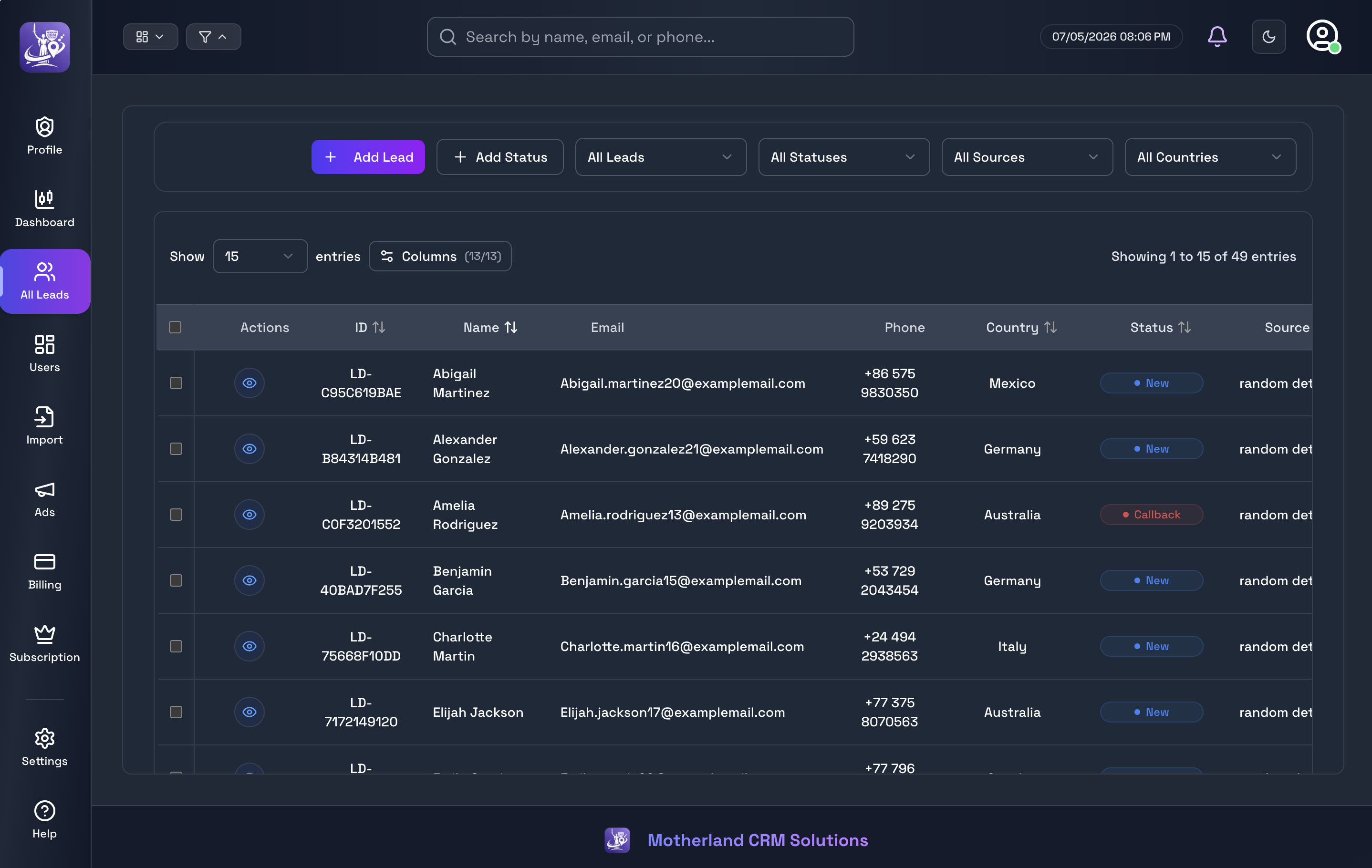
The admin leads table (/dashboard/all-leads) is the most feature-rich component in the application. It is built on TanStack React Table v8 with a fully server-side data flow — only the current page of leads is ever transmitted to the browser, keeping the UI fast even with hundreds of thousands of leads.
- Server-side pagination — leads are fetched one page at a time with configurable page sizes (15, 25, 50, 100). The total record count is returned separately so the pagination controls always display the correct page count.
- Include / exclude multi-filters — filter simultaneously by agent, country, lead status, source, and full-text search. Each dimension supports include or exclude mode. All filters sync to the URL as query parameters so filtered views are shareable, bookmarkable, and survive refresh.
- Drag-and-drop column reorder — using dnd-kit, any column header can be dragged to a new position. The column order is persisted to localStorage per table and survives browser refresh.
- Column visibility toggle — hide columns that are not relevant to the current workflow. Visibility preferences are also saved per table in localStorage.
- Bulk operations — select multiple leads using checkboxes. A sticky selection banner appears with bulk assign, unassign (with confirmation), status change, or delete.
- Refetch indicator — a subtle "updating" badge appears while the table is silently refetching in the background (e.g. after a filter change or Ably event), without blocking user interaction.
- Sort by any column — click any sortable column header to sort ascending/descending. Sort state is stored in Zustand and persisted across navigation.
- Inline lead panel — clicking any row opens the lead detail panel without any navigation, leaving the table visible in the background.
The Lead Details Panel
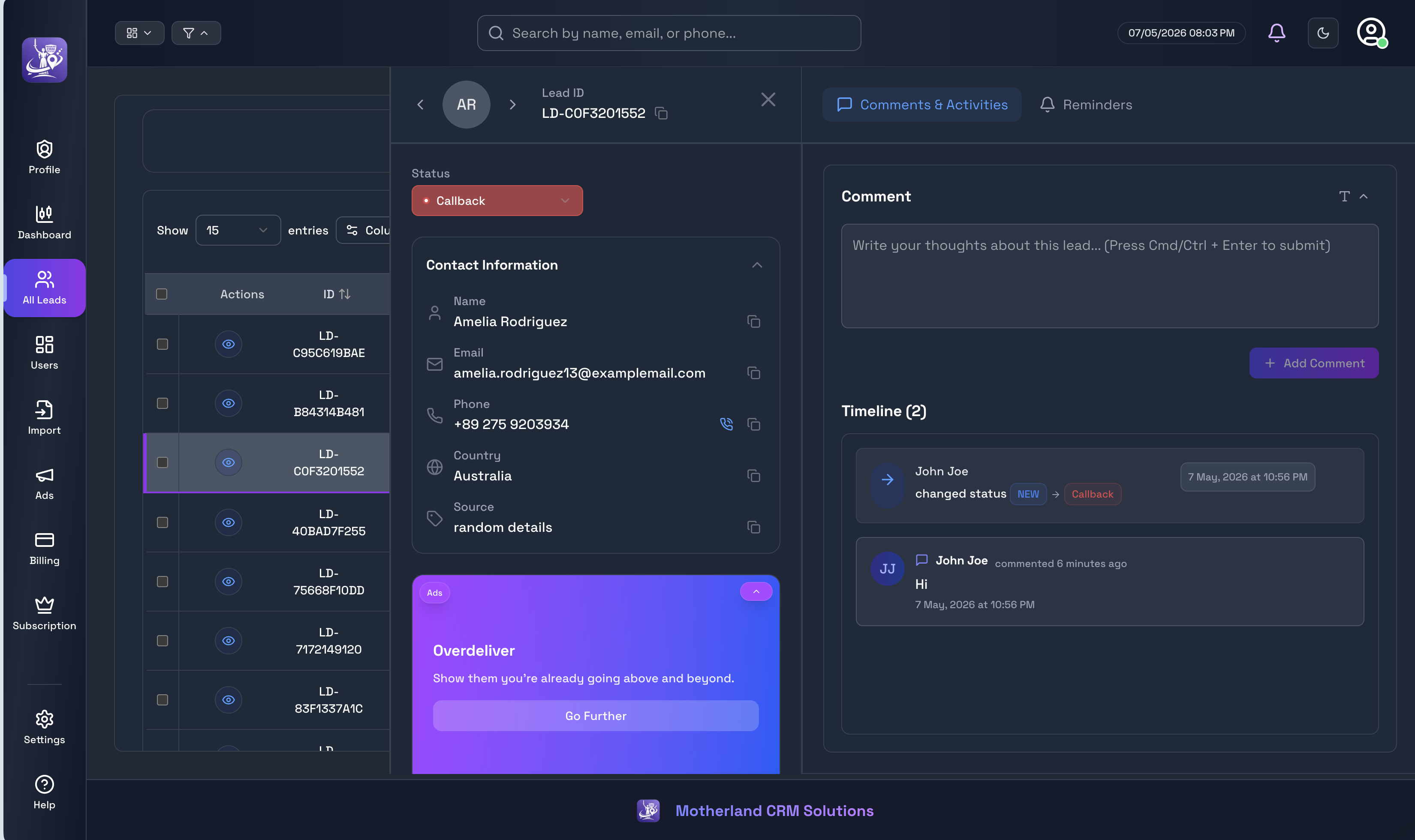
The lead details panel is the core agent workflow surface. It slides in from the right side of the screen (80vw wide, max 1200px) using a Framer Motion animation — smooth, fast, and non-blocking. The table remains visible behind the panel so agents never lose their list context.
Inside, the panel is a two-column layout. The left column (40% width) contains the lead's status badge with a one-click change widget, contact information (phone, email, country — masked or visible based on agent permissions), a rotating image/motivational content slider, and the lead's source and detail fields. The right column (60% width) contains a tabbed interface switching between free-text comments and a chronological activity log showing every action ever taken on the lead.
- Prev/Next navigation — keyboard and button navigation between leads in the current filtered/sorted list, without closing and reopening the panel
- ESC key to close — standard keyboard accessibility
- Browser tab title updates — when the panel is open, the document title changes to "[Lead Name] - Motherland CRM" so the tab is identifiable
- Ably realtime sync — if another user updates the lead while the panel is open, the panel data refreshes automatically
- Optimistic status updates — when an agent changes a lead's status, the UI updates instantly. A timestamp guard prevents background Ably events from overwriting in-flight manual changes
- Filtered-out leads stay open — if an agent applies a filter that hides the current lead from the table, the panel stays open. The system distinguishes "filtered out" from "deleted" and only closes the panel on genuine deletion
// Framer Motion panel animation
<motion.div
  className="fixed right-0 z-50 flex bg-white border-l-2 dark:bg-gray-800"
  style={{
    width: "80vw",
    maxWidth: "1200px",
    top: "80px",
    bottom: "80px",
    height: "calc(100vh - 160px)",
  }}
  initial={{ x: "100%" }}
  animate={{ x: isClosing ? "100%" : 0 }}
  transition={{ type: "tween", duration: 0.25, ease: "easeOut" }}
>
  {/* Left: Status, Contact, Ads, Details */}
  {/* Right: Comments + Activity tabs */}
</motion.div>
CSV & Excel Import Engine
The import engine is one of the most critical features in the entire application. Many customers' entire motivation for using the CRM is to move their existing Excel data into a modern system. Early versions used a straightforward batch insert; production volume forced a rethink into a staged, resumable pipeline with a detached worker, Ably progress, and a dedicated load-test suite so 10k–50k row uploads stay reliable under concurrent tenants.
How the Import Pipeline Works
- Step 1 — File Upload: Admin uploads a .csv, .xlsx, or .xls file. The file is read client-side using the xlsx library.
- Step 2 — Header Detection: Each column header is fuzzy-matched against a headMappings.ts dictionary of known synonyms per field.
- Step 3 — Row Validation: Every row is validated through Zod schemas. Rows with invalid phone numbers, missing required fields, or bad emails are flagged with row-level errors.
- Step 4 — Preview: The admin is shown a preview of valid rows vs error rows before committing.
- Step 5 — Chunked Staging: Valid rows are posted in ~5k client chunks to the imports stage API and stored as ImportStagingChunk documents (not a single blocking insertMany on the request thread).
- Step 6 — Queued Worker: A detached importWorker claims the job with a lease, drains up to 100 staging chunks per tick via bulkWrite upserts, publishes Ably progress, and resumes from nextChunkIndex after crashes.
- Step 7 — Tenant Policy: One active processing import per tenant (others stay queued); different tenants may drain in parallel (IMPORT_WORKER_MAX_JOBS). Job-level quota checks replace per-chunk find+reconcile for throughput.
- Step 8 — Import Record: Each session is saved as an Import document (filename, counts, errors, cursor, worker claim) so history, resume, and admin UI stay honest under load.
// Header mapping — data-driven fuzzy column matching
// headMappings.ts (excerpt)

export const headMappings: Record<string, string[]> = {
  firstName: ["first name", "firstname", "fname", "given name", "forename"],
  lastName:  ["last name", "lastname", "lname", "surname", "family name"],
  email:     ["email", "email address", "e-mail", "emailaddress"],
  phone:     ["phone", "phone number", "phonenumber", "mobile", "cell", "tel"],
  country:   ["country", "nation", "location", "region"],
  status:    ["status", "lead status", "stage"],
  source:    ["source", "lead source", "origin", "channel"],
};

// For each incoming column header, find the best match
function detectColumnMapping(headers: string[]): Record<string, string> {
  const mapping: Record<string, string> = {};
  for (const header of headers) {
    const normalized = header.toLowerCase().trim();
    for (const [field, aliases] of Object.entries(headMappings)) {
      if (aliases.includes(normalized)) {
        mapping[header] = field;
        break;
      }
    }
  }
  return mapping;
}
Billing & Payment System
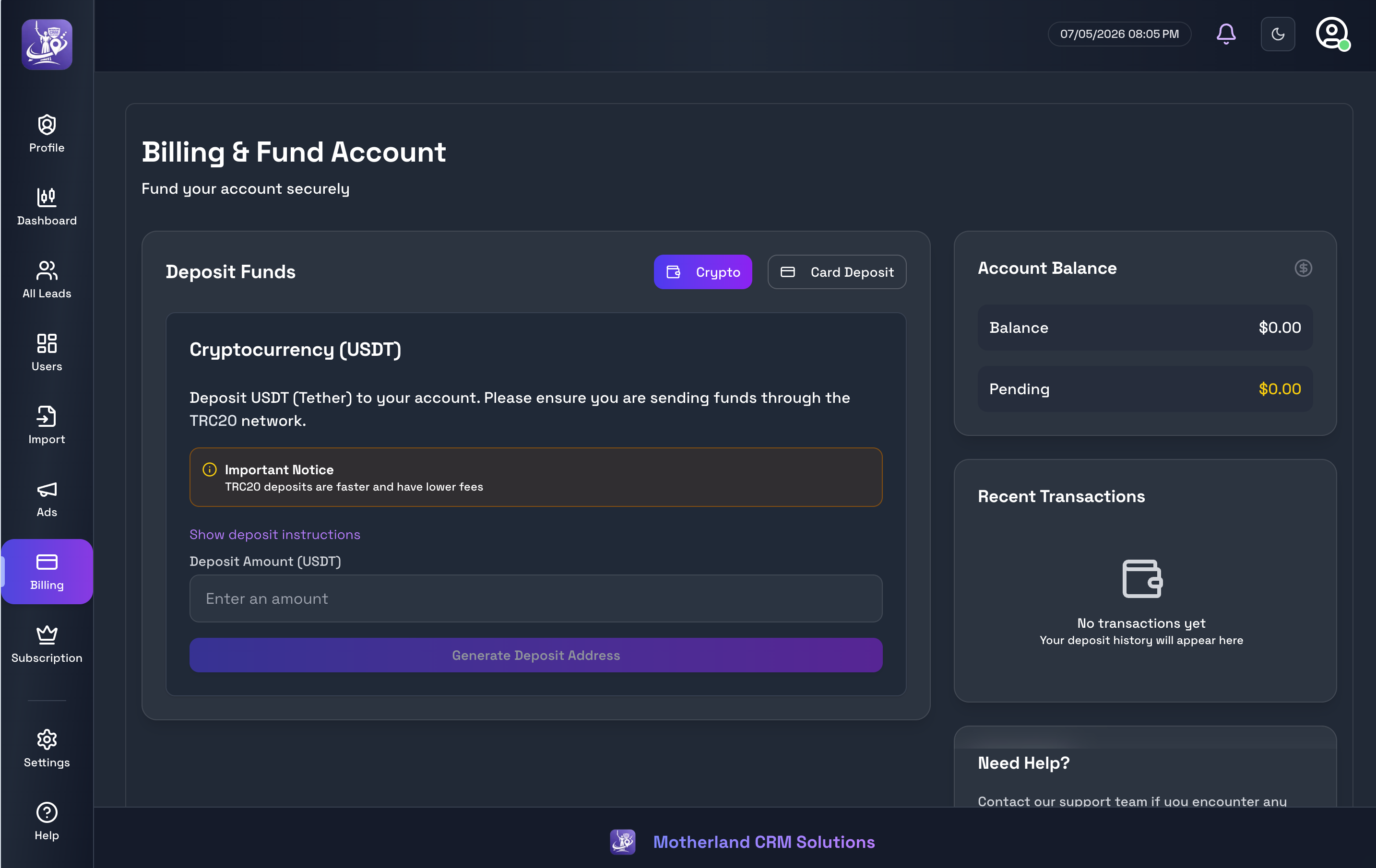
The billing system is designed for manual, admin-reviewed payment approval — appropriate for a B2B product in its early stages where every transaction is verified directly by the platform operator. Admins deposit funds via USDT cryptocurrency on either the TRC20 or ERC20 network.
Deposit Flow
- Admin enters a deposit amount and selects TRC20 or ERC20 network
- A payment record is created via POST /api/payments with status PENDING
- The UI displays a wallet address and a QR code generated from that address using the react-qr-code library
- Admin sends the USDT to the displayed address and clicks "I've sent the payment" to confirm
- The payment sits in PENDING state — the payment amount and transaction are stored for operator review
- The platform Super Admin sees a pending payment notification and navigates to /dashboard/payment-details/:id
- Super Admin clicks Approve or Reject
- On Approve: the admin's balance field is credited via an atomic MongoDB update at POST /api/payments/:id/approve
- On Reject: the payment is marked FAILED and no balance is credited
- All transactions appear in the Recent Transactions list with status badges (PENDING = yellow, COMPLETED = green, FAILED = red)
The current deposit state is persisted to localStorage so if an admin accidentally closes the tab mid-flow, the pending deposit QR code reappears when they return. The billing sidebar always shows the current balance, total deposits lifetime, and any pending amount awaiting approval.
Subscription Plans & Usage Limits
Every admin account starts on a 3-day free trial with a limit of 50 leads and 1 agent. After the trial, they must choose a paid plan to continue. Three plans are available:
- Basic — Free 3 days - 50 Leads import , 1 team members,
- Starter — $10.99/month: Up to 10,000 leads, 2 team members, CSV/Excel import, full activity logging
- Professional — $19.99/month: Up to 30,000 leads, 5 team members, bulk operations, custom fields
- Enterprise — $199.99/month: Unlimited leads, unlimited members, all features, priority support
Usage limits are enforced server-side on every lead create, import operation, and agent creation attempt. If an admin tries to import 500 leads but they only have 50 remaining in their allowance, the API returns a clear 403 response detailing how many leads they can import. A SubscriptionGuard component wraps limit-sensitive UI sections to show an upgrade prompt when limits are reached.
Notifications & Reminders
The notification system serves two purposes: system alerts (payment submitted, lead assigned, import complete) and user-created follow-up reminders. The notification bell in the navbar shows an unread count badge that updates in real time via Ably — new notifications appear instantly without any polling.
Reminders are a separate subsystem. Any agent or admin can attach a reminder with a specific dueAt to any lead, and snooze via snoozedUntil when a follow-up needs to slip. The ReminderNotifications component — mounted at the dashboard layout level — polls for due reminders and surfaces them as floating toast notifications with an optional audio ping. This ensures agents never miss a follow-up call, even while they are working on other leads. Sub-admins with MANAGE_REMINDERS can edit or delete any reminder on a lead, including completed ones.
Field-Level Permissions
Admins can control exactly what each agent is allowed to see on a per-field basis. This is particularly important for businesses with compliance requirements around personal data. Two permission flags are set per agent: and the detail panel. The masking happens at the API response level — the full number is never sent to the browser if the agent lacks permission.
- canViewPhoneNumbers — if false, phone numbers appear as "+1 (***) ***-7890" in both the table
- canViewEmails — if false, email addresses are partially masked ("j**@domain.com"). Again enforced server-side in the API response, not just hidden in the UI.
User Management
The users page (/dashboard/users) is the admin's agent management centre. Admins can create new agents, edit their details, activate or deactivate accounts, and view call log history. The users table mirrors the leads table architecture — TanStack React Table, draggable column reorder, column visibility toggles, and search filtering.
- Create Agent / Sub-admin modal — country picker with phone validation, role selection, and SUBADMIN permission checkboxes
- Edit Team Member modal — update fields, change role, grant or revoke permissions, reset password
- Deactivate/Activate — toggling status prevents login without deleting data or reassigning leads
- Call Logs modal — chronological call history for any agent, including dialer source
- Usage Limits Display — see how many of their allowed leads and users an admin has consumed
State Management Architecture
State in this application is intentionally split across multiple layers, each responsible for a different concern. Using the wrong state layer is a common source of bugs — for example, storing server data in local state causes it to go stale, while storing UI state in React Query causes unnecessary API calls.
- TanStack React Query — owns all server state (leads, users, payments, notifications, stats). Handles caching, background refetching, loading/error states, and cache invalidation on mutations.
- Zustand — owns cross-component UI state that has no server representation: which lead is selected, whether the details panel is open, the bulk-selected leads array, and the current sort order.
- React Context — owns narrow, tree-scoped state: search query (SearchContext), global statuses list (StatusContext), leads page toggle state (ToggleContext), date format preferences (DateTimeSettingsContext), dialer settings (DialerSettingsContext).
- URL query params — owns shareable state: current page number, active filters (status, country, source, assigned user), search query, and the currently-open lead ID. This is the most important decision — any state that should survive a page refresh or be shareable via link lives in the URL.
- localStorage — owns user preferences with no server backing: column order, column visibility, sidebar theme preference, lead panel state persistence during accidental tab close.
- useRef — owns non-reactive values that must not trigger re-renders: callback references, animation state flags, abort controllers, timestamps of last manual updates.
API Design
All backend logic lives in Next.js App Router API route handlers under /src/app/api/. The API is session-authenticated — every protected route reads the NextAuth session from the request, extracts the userId and role, and uses that to scope all database operations. API routes never trust client-supplied user IDs.
// Example: GET /api/leads — always scoped to authenticated user's workspace
export async function GET(request: NextRequest) { const session = await getServerSession(authOptions);
  if (!session?.user?.id) {
    return NextResponse.json({ error: "Unauthorized" }, { status: 401 });
  }

  const { searchParams } = new URL(request.url);
  const page    = parseInt(searchParams.get("page") ?? "1");
  const limit   = parseInt(searchParams.get("limit") ?? "15");
  const status  = searchParams.get("status");
  const country = searchParams.get("country");
  const search  = searchParams.get("search");

  // Determine adminId from session — never from client input
  const adminId = session.user.role === "ADMIN"
    ? session.user.id
    : session.user.adminId;

  const query: Record<string, unknown> = { adminId };

  // AGENT can only see their assigned leads
  if (session.user.role === "AGENT") {
    query.assignedTo = session.user.id;
  }

  // Apply optional filters
  if (status && status !== "all") query.status = status;
  if (country && country !== "all") query.country = country;
  if (search) {
    query.$or = [
      { firstName: { $regex: search, $options: "i" } },
      { lastName:  { $regex: search, $options: "i" } },
      { email:     { $regex: search, $options: "i" } },
    ];
  }

  const [leads, total] = await Promise.all([
    Lead.find(query).sort({ createdAt: -1 }).skip((page - 1) * limit).limit(limit).lean(),    Lead.countDocuments(query),
  ]);

  return NextResponse.json({ leads, total, page, limit });
}
Key API Endpoints
- GET /api/leads — paginated, filtered lead list scoped to admin workspace
- POST /api/leads — create a single lead
- GET /api/leads/:id — single lead details
- PUT /api/leads/:id — update a lead (status, comments, any field)
- DELETE /api/leads/:id — delete a lead
- POST /api/leads/assign — bulk assign leads to an agent
- POST /api/leads/bulk — bulk delete or bulk status change
- POST /api/leads/import — import leads from parsed CSV/Excel data
- GET /api/leads/stats — dashboard counts (total, assigned, unassigned, my leads)
- GET /api/leads/countries — distinct country values for filter dropdown
- GET /api/leads/sources — distinct source values for filter dropdown
- GET /api/leads/status-counts — counts grouped by status for stats display
- GET/POST /api/users — list or create agents
- GET/PUT /api/user/profile — own profile read and update
- GET/POST /api/payments — list payments or create deposit request
- POST /api/payments/:id/approve — approve a pending payment, credit balance
- POST /api/payments/:id/reject — reject a pending payment
- GET/POST/PUT /api/notifications — notification CRUD
- GET /api/subscription — current subscription details
- GET /api/ably — generate Ably auth token and return adminScope
- GET /api/ably/scope — resolve adminScope for channel naming
- GET /api/health — health check
- GET/POST /api/call-logs — agent call history with dialer source metadata
UI & Design System
The app supports light, dark, and system appearance, chosen per user and persisted with next-themes. Colour is driven by tenant brand tokens (--brand-from / --brand-to), the default is an ocean-teal gradient (#2D6F8B → #2E8EB8), and admins can change colours, fonts, and solid or gradient buttons in dashboard/settings page. The whole workspace (including agents) matches their Admin's brand.
- Collapsible sidebar — frees horizontal space on dense lead tables; preference survives the session
- Seasonal holiday overlays — date-window effects (New Year, Valentine, Women’s Day, St. Patrick, Independence, Halloween, Thanksgiving, Christmas) lazy-loaded so the dashboard stays light the rest of the year
- Navbar + active nav pills with light/dark variants via next-themes
- Self-hosted brand fonts — avoids layout shift from third-party font CDNs on branded hosts
- All interactive elements have hover, focus, and active states with smooth CSS transitions
- Shimmer skeleton loading states appear during data fetches — no abrupt blank→data flashes
- Toast notifications + Radix dialogs/selects for accessible confirmations (unassign, delete, etc.)
Dashboard Layout Structure
┌──────┬──────────────────────────────────────────────┐
│      │  DashboardNavbar                             │
│      │  [Toggle btns][Search Bar][Time][Bell][User] │
│      ├──────────────────────────────────────────────┤
│Side  │  SelectedLeadsBanner (when leads selected)   │
│ bar  ├──────────────────────────────────────────────┤
│ 96px │  <main> — Page content                       │
│      │                                              │
│Logo  │  ╔═══════════════════════════════╗           │
│      │  ║  Lead Details Panel (80vw)    ║           │
│Nav   │  ║  slides in from right         ║           │
│items │  ╚═══════════════════════════════╝           │
│      ├──────────────────────────────────────────────┤
│      │  Footer                                      │
│      │  ReminderNotifications (floating toasts)     │
└──────┴──────────────────────────────────────────────┘
Sub-Admin Permissions — Elevating Agents Without a Second Owner
Real sales floors need floor managers who can reassign leads or clean up comments without getting the billing keys. The SUBADMIN role solves that. Tenant staff (AGENT and SUBADMIN) always keep adminId pointing at the workspace owner — documented in roles.ts — so a sub-admin never becomes a parallel tenant.
Capabilities are opt-in. An ADMIN grants any combination of ASSIGN_LEADS (open All Leads, filter by agent, assign/unassign), EDIT_LEAD_STATUS (including bulk), MANAGE_REMINDERS (edit/delete any reminder), and DELETE_COMMENTS (edit/delete any comment or timeline activity). UI surfaces like RoleAndPermissionsFields keep the grant list honest: what you check in the users modal is what the API enforces.
Dashboard Status Analytics
The /dashboard overview is more than headline counts. /api/leads/status-counts returns workspace-scoped tallies grouped by status, and the client renders them with Recharts as bar and pie views. That gives admins a board-level read on pipeline health without exporting to a spreadsheet — which was the whole point of leaving Excel.
Softphone Dialer & Call Logs
Agents live on softphones. Settings let each user point the CRM at MicroSIP or Zoiper (and related dialer options). When a call is logged, CallLog stores the lead reference plus the dialer source so managers can audit how outreach actually happened. Call-log channels on Ably keep the users page history fresh without a hard refresh.
Holiday Animations — Seasonal Presence Without Shipping Weight Year-Round
Sales teams live in the dashboard daily, so seasonal polish matters — but Christmas snow in July does not. Holiday effects are driven by date-window rules in holidayEffectsConfig.ts (New Year, Valentine’s Day, International Women’s Day, St. Patrick’s Day, Independence Day, Halloween, Thanksgiving, Christmas). resolveActiveHolidayEffect picks the first matching rule without importing any animation code, so the dashboard shell stays cheap on ordinary days.
HolidayEffectsController (wired in the dashboard layout) dynamic-imports HolidayEffectsOverlay with ssr: false, then mounts the matching Framer Motion effect — confetti, cupid, petals, clovers, fireworks, bats, falling leaves, and Christmas motifs built from shared flying/falling emoji primitives. Users can toggle effects via localStorage (holidayEffectsEnabled), and prefers-reduced-motion disables them entirely. Intensity per holiday (low / medium / high) keeps Valentine quieter than New Year without rewriting each component.
- Date rules only in holidayEffectsConfig.ts — animation chunks stay out of the resolve path
- First matching rule wins; windows span a few days around each holiday
- Dynamic import + client-only overlay — no SSR cost for motion trees
- localStorage enable/disable + prefers-reduced-motion respect
- Unit/component tests around resolveActiveHolidayEffect and the overlay controller
Host-Based Multi-Brand Theming
One codebase serves more than one brand. appBranding.ts maps hostname → display name, support email, Telegram, fonts, and theme tokens. Motherland and Vertex are first-class presets; unknown hosts fall back to NEXT_PUBLIC_APP_NAME for local/dev. Favicons and self-hosted fonts follow the active brand so white-label demos do not ship with the wrong chrome.
Testing Strategy
As the CRM grew past “works on my machine,” I consolidated the suite under src/tests/ and documented everything in TESTING.md. On my latest full run, Vitest reported 44 files / 237 passed / 1 skipped (238 total) in about 6.6s — covering domain helpers, Zod schemas, API auth/tenant isolation, CSV parsing, import worker/batch limits, holiday overlays, and UI components. Playwright’s default suite (after e2e seed) ran 11 tests: 6 passed (seeded lead lifecycle + public smoke) and 5 skipped (opt-in import pressure/concurrent/same-tenant/soak plus the Ably realtime sync spec). GitHub Actions on Node 22 keeps Vitest + Playwright smoke on every PR; the heavy import profiles stay local/opt-in because they need Mongo and disposable tenants.
Multi-tenancy — admin scope isolation and agent assignment boundaries — is treated as a first-class concern across unit, API, and load tests. The realtime Ably browser↔browser spec remains skipped (test.fixme) until attach timing is stable in headless CI.
Import Pipeline Testing — Measured Results
Import is where spreadsheet chaos meets production databases, so the testing story is layered on purpose. Unit and API tests cover batch limits, subscription/tenant caps, worker claim/lease/resume, and the imports routes. Heavier harnesses are opt-in npm scripts so default CI stays fast while still proving throughput and isolation against real Mongo. Below are measured numbers from a full local run against Atlas — not theoretical targets.
What each layer covers
- Vitest (src/tests/) — importWorker, importBatchLimits, subscription/tenant import limits, api.imports (+ process) routes, csvImport parsing, importSpeedAndSync UI behavior; import.mongo.load stays gated unless RUN_IMPORT_MONGO_LOAD=1 enables the Level 4 profile.
- Mongo import-load harness (scripts/import-load-harness.mjs) — disposable @import-load.motherland.test tenants; profiles quick / correctness / medium(=standard) / heavy / stress. Write path is ordered:false bulkWrite upserts on email+adminId (not per-row Lead.create). Claims only what it proves: concurrent multi-tenant isolation with no cross-tenant contamination — not “blazing-fast imports.”
- Midflight kill + resume (test:import-midflight-kill) — seed 6×400 staged leads, disconnect Mongo mid-bulkWrite, then resume: status failed with partialLeads=400, then completed with 2400/2400 after drain.
- HTTP soak (Playwright import-http-soak) — real stage→worker APIs: 10k completed in ~60.6s (~165 leads/s total, ~266/s worker); 50k completed in ~6.2 min (~134 leads/s total, ~186/s worker).
- HTTP bench compare (test:import-http-bench:50k) — before (1k chunks, drain 5, per-chunk quota) vs after (5k chunks, drain 100, job quota): total ~560.6s → ~230.7s (−58.9%), ~89 → ~217 leads/s (+143%), Mongo round-trips 210 → 12 (−94%), bulkWrites 35 → 10, quotaChecks/emailFinds 35 → 0.
- Concurrent multi-tenant HTTP (import-http-concurrent) — 5 tenants × 50k via stage+worker completed twice (~338–366s wall, ~684–739 aggregate leads/s); each tenant successCount=50000.
- Same-tenant queue policy (import-http-same-tenant) — with IMPORT_STAGE_AUTO_KICK=0, import #2 waits while #1 processes; both finished at 5000 processed.
- Browser pressure (import-browser-pressure) — real /dashboard/import UI: 10k CSV ~58.6s completed; 50k CSV ~210s (~3.5 min) completed with stable heap reporting in the harness.
Mongo load harness profiles (inline bulkWrite)
- Quick — 100/500/1k single-tenant + 3×1k concurrent; duplicate re-import, invalid-row mix, same-email across tenants, isolation, unique index, upsert-no-overwrite, overlapping race, mid-fail+resume — all ok.
- Correctness — smaller volumes focused on races, resume, and index/upsert safety — ok.
- Medium / standard — 5k ~508–562/s; 10k ~554–713/s; 3 tenants × 10k concurrent aggregate ~922–925/s; isolation + correctness gates ok.
- Heavy — 25k ~572/s; 50k ~555/s; 5 tenants × 10k concurrent aggregate ~1177/s; peak RSS ~222MB — ok.
- Stress — 100k single-tenant ~582/s (~2.9 min); 10 tenants × 10k concurrent aggregate ~1858/s; peak RSS ~323MB; isolation findings=0 — ok.
Product defaults proven by the benches
- Client staging chunk size: 5,000 rows (IMPORT_CLIENT_CHUNK_SIZE)
- Worker drain: 100 chunks per tick (IMPORT_WORKER_CHUNKS)
- Quota mode: job-level (create check + end-of-job cap) instead of per-chunk find/reconcile
- Worker leases with crash reclaim; staging chunk rollback on lost claim so resume is safe
- One active processing import per tenant; parallel drain across tenants via IMPORT_WORKER_MAX_JOBS
- Product path: POST /api/imports (202) → stage chunks → queued job; /api/imports/run (+ cron) drains with exclusive claim + cursor resume; Ably import_progress
Default CI does not run import-load, 50k soak, concurrent, or browser-pressure jobs — they are intentionally local/opt-in so PRs stay fast. The recommendation triage in TESTING.md marks concurrent multi-tenant load, detached worker + cursor resume, chunked staging, mid-import kill/resume, HTTP soak, and browser pressure as done. (Note: the package script test:import-load:concurrent10k currently points at an unknown IMPORT_LOAD_PROFILE; use medium/heavy concurrent sections or the HTTP concurrent Playwright specs instead.)
Engineering Challenges & How I Solved Them
Challenge 1 — Full Page Refresh on Click in Production
In production, clicking any interactive element on the leads page caused a full page reload. This did not happen in development. The root cause was a Next.js Link component wrapping interactive table row elements — the App Router's link prefetching behaviour conflicted with the table's click handlers and triggered a full navigation event instead of a client-side route change. The fix was to remove the Link wrapper from table rows entirely and use router.push() programmatically in the row's onClick handler, with e.stopPropagation() on child interactive elements.
Challenge 2 — Lead Panel Stuck on Previous Lead
After closing the lead panel and clicking a different lead, the panel would sometimes briefly show the previously-selected lead's data. The root cause: the close handler set selectedLead to null in Zustand, but a downstream useEffect was re-reading the URL's ?lead= param and re-populating selectedLead before the panel unmounted. The fix was to introduce a separate isPanelOpen boolean in the Zustand store. The panel renders only when isPanelOpen === true AND selectedLead !== null. The close handler sets both to their closed values atomically, preventing any race between the close and the URL-reading effect.
Challenge 3 — Session Expiry Not Enforced
Users could remain logged in indefinitely because NextAuth's SessionProvider returns a cached session object even after the 24-hour window. The fix was the three-layer system described in the Auth section: JWT callback strips the ID from expired tokens, session callback returns an empty object instead of null (returning null causes a runtime crash in some SessionProvider versions), middleware redirects at the edge, and a client-side 5-minute interval triggers graceful sign-out. All four layers must be present — any single one is insufficient.
Challenge 4 — Ably Channel Cleanup Race Condition
When the lead panel unmounted rapidly (navigating between leads quickly), Ably threw "Can only release a channel in state 'attached' or 'detached'" because detach() and release() were racing each other. The fix: an isDisposed ref flag is set true in the cleanup function. All async operations check this before proceeding. The cleanup function now awaits channel.detach() before calling channels.release(), ensuring correct sequencing. Transient "connection closed" states are retried once after 800ms before surfacing as errors.
Challenge 5 — Horizontal Overflow on Leads Page
The leads page had an unexpected horizontal scrollbar causing visible white-space at the page edges. Root cause: the flex child wrapping the main content area was missing min-w-0. Without it, Flexbox children do not shrink below their natural min-content width, causing the container to overflow. Adding min-w-0 to the flex column containing the navbar and main content resolved it completely. This is a classic and easy-to-miss Flexbox gotcha.
{/* The fix — min-w-0 prevents flex children overflowing their container */}
<div className="flex h-screen bg-background">
  <Sidebar />
  {/* Without min-w-0 here, this div never shrinks below its content width */}
  <div className="flex flex-col flex-1 min-w-0 overflow-hidden">
    <DashboardNavbar />
    <main className="flex-1 p-8 overflow-auto">
      {children}
    </main>
    <Footer />
  </div>
</div>
Challenge 6 — Optimistic Updates vs. Realtime Events
When an agent changes a lead's status, the UI updates instantly (optimistic update). But within milliseconds, an Ably realtime event also arrives from the server (triggered by the same update) and attempts to overwrite the panel state with "fresh" server data — sometimes carrying slightly stale data if the Ably event arrived before the database write was fully consistent. The fix: a lastManualUpdateRef stores a timestamp every time the user manually updates a lead. Incoming Ably events and query cache updates only overwrite the panel state if the event's updatedAt timestamp is newer than the current panel data AND at least 500ms have passed since the last manual update.
Performance Optimisations
- Server-side pagination on all lead tables — only the current page of data crosses the network, never the entire collection. This keeps API response times under 200ms even with 100k+ leads.
- Compound MongoDB indexes covering the most common filter combinations (adminId + country, adminId + source) — prevents full collection scans on filtered queries.
- React Query staleTime tuning — dashboard stats refetch every 5 minutes, lead lists refetch on window focus and after mutations, user profile data is cached for 10 minutes.
- Debounced search input — API calls are only triggered after 300ms of no typing. Eliminates a request on every keypress.
- Memoised table column definitions — column definitions are wrapped in useMemo so the table instance does not reconstruct on every unrelated re-render.
- react-window for virtualised list rendering — used in high-count dropdown lists (countries, sources) to avoid rendering thousands of DOM nodes.
- useRef for non-reactive values — timers, callback references, and state flags that don't need to trigger re-renders live in refs rather than useState.
- Image lazy loading — all images in the application use Next.js Image component with lazy loading and responsive sizes.
- Font subsetting — Space Grotesk is loaded with subsets: ["latin"] to reduce the font bundle size.
Project Scale
- 200+ total source files
- 15,000+ lines of TypeScript and TSX
- 45+ custom React hooks
- 140+ React components across all feature areas
- 30+ API route handlers
- 12+ Mongoose database models
- 20+ database indexes
- 237 Vitest tests passing in src/tests/ (+ 1 skipped gate); Playwright smoke + seeded lifecycle; measured import load through 100k and HTTP 5×50k concurrent
- 16+ dashboard pages and routes
- ADMIN / SUBADMIN / AGENT RBAC with grantable permissions
- Host branding for Motherland + Vertex
- Full dark mode + seasonal holiday animations (8 date-window effects)
What I Learned
1. The URL is the best state manager for shareable views
Keeping filter state, pagination, and the currently-open lead in the URL as query params was one of the best architectural decisions I made. It makes the app feel native — filtered views are shareable, specific leads are bookmarkable, and browser back/forward work naturally. The difficult part is maintaining three-way sync between the URL, React state, and server data without creating infinite update loops. Using useRef to track whether a URL update was user-initiated vs programmatic was the key to solving this.
2. Real-time is mostly a cache invalidation problem
Connecting to Ably was straightforward. The hard part was deciding exactly which React Query cache keys to invalidate when each event type arrived, and in what order. Invalidating too broadly causes excessive refetches. Invalidating too narrowly leaves stale data on screen. The right answer — invalidate by predicate function on the query key root — took several iterations to land on correctly.
3. Hard session expiry needs to be enforced at every layer
A genuinely hard 24-hour session — one that cannot be extended by activity — requires changes in at least four places: the JWT callback, the session callback, the middleware, and the client-side watcher. Missing any single layer creates a gap where the session appears expired in one context but still valid in another, causing confusing and inconsistent behaviour.
4. Multi-tenancy is a discipline, not a feature
Building in the adminId isolation pattern from day one was significantly easier than trying to retrofit it later. Every model, every API endpoint, and every database query must always include the adminId filter. This discipline cannot slip — a single query missing the filter would expose one customer's data to another. I considered adding a lint rule to catch this automatically.
5. Optimistic updates are worth the complexity
Updating the UI immediately — before the server confirms the change — makes the application feel dramatically faster for the operations agents repeat dozens of times per session (status changes, adding comments, logging calls). The extra logic to guard against stale overwrites from Ably events and to handle server failures gracefully is non-trivial but completely worth it for the user experience uplift.
6. Indexes first, queries second
Every query pattern in the application was mapped out before indexes were designed — not after. The compound indexes on (adminId, country, createdAt) and (adminId, source, createdAt) mean that the most common filtered list queries never touch more documents than necessary. Getting indexes right early meant the application scaled to large lead counts without performance degradation.
Conclusion
Motherland CRM is the most complete full-stack application I have built to date. It covers almost every dimension of modern web engineering: authentication with hard session expiry, real-time pub/sub, sortable/filterable tables with include/exclude filters, spreadsheet import pipelines, crypto billing, sub-admin RBAC, dialer-aware call logs, dashboard analytics, multi-brand hosting, and a Vitest/Playwright safety net (237 passing) plus measured opt-in import load, midflight kill/resume, and 50k HTTP soak/bench/concurrent harnesses.
The project started as a simple "import leads from Excel" tool and evolved — driven by real customer feedback — into a complete CRM platform. Each feature added something new to my understanding of the trade-offs between developer velocity and system correctness, and reinforced how much small UX decisions (how fast the panel opens, whether the browser title updates, whether filters survive a page refresh) can determine whether users trust and enjoy the tool they use every day.
Links
- Live demo: https://motherlandcrmsolutions.com/
- GitHub: https://github.com/Princewill-Nanakumor/MotherlandCrmSolutions
- Portfolio project page: https://princewillnanakumor.com/projects/motherland-crm-solutions