Direct Browser-to-S3 Uploads – Building a Production-Ready AWS S3 Image Upload System with Next.js 16 and TypeScript
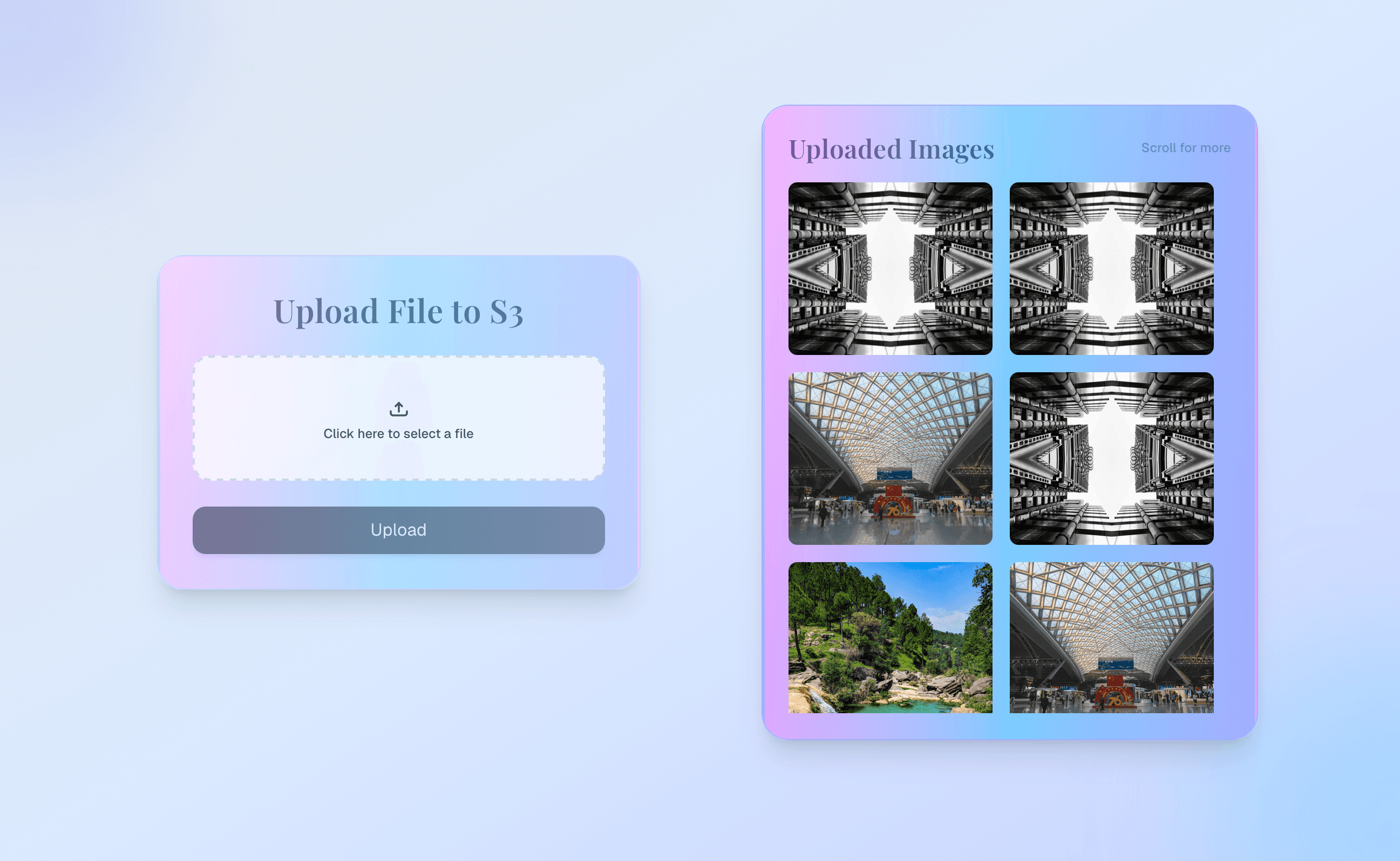
How I built a production-minded S3 image gallery with Next.js 16 — password-gated uploads, HMAC sessions and lockouts, direct browser-to-S3 presigned PUTs, a magic-byte fallback path, cursor pagination, signed/CDN downloads, and authenticated deletes.
Direct Browser-to-S3 Uploads – Building a Production-Ready AWS S3 Image Upload System with Next.js 16 and TypeScript
When building applications that allow users to upload files, it’s tempting to send everything through your application server. While this works for small projects, it quickly becomes expensive, slower, and harder to scale. I wanted an image manager that follows the same storage patterns used in modern SaaS products — and that also has a real access story for demos, not an open write endpoint.
The result is AWS S3 Image Upload: a focused gallery built with Next.js 16, React 19, TypeScript, Tailwind CSS v4, and Amazon S3. It supports direct uploads with short-lived presigned URLs, an authenticated multipart fallback that sniffs file bytes, cursor pagination, signed (or CDN) downloads, delete confirmation, and a password gate with brute-force lockouts — while keeping large binary traffic off Node when the direct path succeeds.
Why Direct-to-S3 Uploads Matter
Many applications upload files like this: Browser → Application Server → AWS S3 Although simple, every file passes through your server first. That increases bandwidth usage, CPU utilization, memory consumption, and overall hosting costs. Instead, the app mints a short-lived PutObject URL so the browser uploads directly to Amazon S3.
Browser
    │
    │ POST /api/upload  { fileName, fileType, fileSize }
    ▼
Next.js API (auth + validate)
    │
    │ Presigned PutObject URL (5 min)
    ▼
Browser
    │
    │ PUT file → S3
    ▼
Amazon S3
Application Structure
The UI is a single App Router page orchestrated by S3UploadCard: left side for password unlock / upload, right side for the public gallery. Mutations go through API routes; AWS specifics live in lib/aws and lib/uploads.
aws_s3project/
├── app/
│   ├── page.tsx                 # gallery + upload shell
│   └── api/
│       ├── auth/login|status|logout
│       ├── upload/              # mint presigned URL
│       ├── upload/fallback/     # multipart PutObject
│       ├── files/               # list + cursor page
│       ├── delete/
│       └── file-url/            # refresh signed GetObject
├── components/
│   ├── S3UploadCard.tsx · PasswordGate.tsx
│   ├── UploadDropzone.tsx · UploadedImagesGrid.tsx
│   └── ImagePreviewModal.tsx · ConfirmDeleteModal.tsx
└── lib/
    ├── auth/   # cookies, HMAC session, rate-limit, requireAuth
    ├── aws/    # S3Client + config (region, bucket, CDN)
    └── uploads/# validation, key generation, download URLs
Password Gate, Sessions, and Lockouts
Uploads and deletes are not public. A shared APP_ACCESS_PASSWORD unlocks mutations. On success, the API sets an HMAC-SHA256 signed HttpOnly session cookie (7-day TTL, SameSite=Lax, Secure in production). Password compares use timing-safe equality.
Failed logins are rate-limited hard on purpose: two failures lock the device for five hours. The lock is dual-layer — an in-memory Map keyed by device ID, a signed lock cookie, and a matching localStorage state on the client — so a refresh does not reset the counter casually. requireAuth guards /api/upload, /api/upload/fallback, /api/delete, and /api/file-url. Gallery listing stays public so the demo can show images without sharing the password.
- POST /api/auth/login — verify password, set session or return LOCKED (429)
- GET /api/auth/status — restore session / lock state on page load
- POST /api/auth/logout — clear session cookie
- MAX_PASSWORD_ATTEMPTS = 2 · LOCK_DURATION = 5 hours · SESSION = 7 days
Building a Reliable Upload Workflow
Direct uploads are efficient, but browsers fail for CORS issues, network interruptions, or expired signatures. Instead of only showing an error, the client tries the authenticated multipart fallback and reuses the same object key when possible so the gallery stays consistent.
Authenticated client
  → client validate (image/*, allowed ext, ≤5MB)
  → POST /api/upload → { key, uploadUrl }
  → PUT uploadUrl (Content-Type = file.type)
        │
   success? ──yes──▶ refresh gallery
        │
       no
        ▼
  POST /api/upload/fallback (multipart + optional key)
  → file-type magic-byte sniff
  → PutObject
  → refresh gallery
Protecting the Storage Bucket
Client-side validation improves UX, but it is never trusted alone. Before minting a presigned URL, the API checks size, MIME, and extension. The fallback route goes further: file-type inspects the buffer’s binary signature and rejects non-images even if the browser lied about Content-Type.
- Maximum file size: 5 MB
- Supported formats: JPG, JPEG, PNG, GIF, WebP, AVIF
- MIME must start with image/
- Extension allowlist on both upload paths
- Magic-byte validation on the fallback path (file-type)
- Sanitized filenames; keys under uploads/{timestamp}-{uuid}-{name}
- Delete and file-url reject keys outside the uploads/ prefix
- Presigned upload URLs expire in 5 minutes; downloads in 15 minutes (unless CDN)
Managing Images After Upload
GET /api/files is unauthenticated and lists objects under uploads/ with cursor pagination (default 12, clamp 1–30). Each page sorts by LastModified descending and returns download URLs — either AWS_S3_CDN_URL when configured, or a 15-minute GetObject signature. The grid supports Load more, shimmer skeletons, a full-size lightbox with prev/next, and authenticated delete with a confirm modal.
GET /api/files?limit=12&cursor=…
  → ListObjectsV2 (prefix uploads/)
  → map keys → CDN or signed GetObject URL
  → { files, nextCursor, hasMore }

Cache: private, max-age=30, stale-while-revalidate=60
Designing for Production Instead of Demos
The app separates responsibilities on purpose: the UI manages interactions, API routes handle auth and orchestration, lib modules encapsulate AWS and validation, and S3 stores bytes. Public read / private write keeps the demo browsable without leaving PutObject open. Optional CDN fronting for reads avoids minting signatures when the bucket is already publicly readable behind a CDN.
- Env: APP_ACCESS_PASSWORD, AUTH_SECRET, AWS region/bucket/keys, optional AWS_S3_CDN_URL
- IAM needs: s3:PutObject, GetObject, DeleteObject, ListBucket on the uploads prefix
- Honest trade-offs: public gallery visibility, in-memory locks vs multi-instance serverless, stronger sniffing on fallback than on the presign path
What I Learned
Production-ready upload apps are shaped by architecture more than by a single happy-path feature. Presigned URLs reduce server load. A fallback path improves reliability. Multi-layer validation and prefix-scoped keys increase safety. A password gate with real lockouts turns a portfolio demo into something you can leave online. Separating auth, upload orchestration, and gallery reads makes the codebase easier to extend without growing into a mini CMS.
- Keep heavy binaries off Node when the direct S3 path works
- Never trust browser MIME alone on the path that still hits your server
- Treat access control and lockouts as product features, not afterthoughts
- Design public browse vs private mutate intentionally
- Cursor pagination and short-lived URLs scale better than dumping a bucket
Links
- Live demo: https://s3imageupload.netlify.app/
- GitHub: https://github.com/Princewill-Nanakumor/aws_s3bucket_image_upload
- Portfolio project page: https://princewillnanakumor.com/projects/aws-s3bucket-image-upload-app